


Vitaliy Andervin
Data Order Market Exchange Trader
Fonts by «ParaType»
© Vitaliy Andervin, 2026
What lies behind candlestick charts: real trades and the logic of the participants. Price is viewed as a consequence of order flow, player structure, and the functioning of systemic capital. Instead of the abstract «volume has increased,» the reader learns to see scenes: absorption and icebergs, stop-losses and short-shorting, useless profits, «cosmetic» volume, spoofs, and DOM updates — and transform them into trading rules and scenarios for further action.
ISBN 978-5-0069-2258-7
Created with Ridero smart publishing system
Contents
Introduction
Trading is the ability to see cause-and-effect relationships where most people see only candles and indicators. If the first book introduced the language of basic market data (volume, delta, limit orders, heatmaps) and taught you to recognize the “footprints” of market participants, this book focuses on how those footprints are formed in real time inside the order book (DOM/LOB) and the time & sales tape (T&S), and how to make precise decisions based on this micro-mechanics.
We move to the matching process itself: from adding and canceling limit orders to queues, priorities, trade aggressors, tick-by-tick transitions, bursts and decay of aggression. You will learn to read context → trigger → confirmation → invalidation at the level of individual ticks and queues, combining the order book, the tape, and the chart into a single coherent scene.
Why the second book matters
— Understand the root causes of volume and delta signals: why “there was a lot of volume” and what exactly created it.
— See the participant behind the trade: aggressor vs. passive side, execution priority, the “signature” of a systemic player.
— Filter illusions: distinguish bait from real intent; recognize absorption, icebergs, spoofing and refresh.
— Bring order to micro-noise: uptick/downtick, bid-ask bounce, tick/time/volume aggregates and their filtering.
What you will learn
— Order Book (DOM/LOB): Bid/Ask structure, spread and mid, depth, “walls” and “ladders,” queues and their imbalances, microprice.
— Time & Sales (T&S): trade aggressor, tick classification, aggregated vs. single prints, size series, stop flows (sweep/exhaustion), bid/ask flip.
— Order-flow patterns: absorption and icebergs, spoof/refresh, “volume inflation,” “volume spread,” and the 50% equilibrium level.
— Practice & participants: indirect estimation of open interest, identifying the side and number of participants in aggregation, the “large-player signature,” and combining tick charts, tape, and DOM to verify hypotheses.
How to work with the book
— Start with the Glossary and Settings Guide: quickly configure DOM and T&S for the task — levels, columns, filters, multi-window layouts, chart aggregates.
— Then move through four chapters: from order book mechanics and ticks to patterns and practical participant recognition.
— Always follow three steps: context (what’s happening with queues/spread) → trigger (what exactly was the event) → confirmation/invalidation (what proves or disproves the hypothesis).
— Practice: tape replay, tick markup, calculation of simple metrics, mini checklists for trades and post-analysis.
Who this book is for
— Traders who want to move from an indicator-driven view to a behavioral one — reading queues and aggression.
— Those already using volume/delta/footprint tools and seeking to understand the root causes of signals.
— Algo and quant practitioners — as an operational description of microstructure and a source of testable rules.
Chapter 1 ● Order Book Mechanics
1.1 Quote Book (Bid/Ask), Spread, Mid Price, Tick Size
1.2 Order Queue and Execution Priorities
1.3 Market Depth and Liquidity Asymmetry; Walls and “Ladders” (Stacked Liquidity)
1.4 Queue Imbalance (L1–L10) and Microprice
Chapter 2 ● Time & Sales Tape. Tick Structure
2.1 Interface and Core Fields
2.2 Trade Side Identification
2.3 Aggregation. Single Trades. Metrics
2.4 Tape ↔ Chart: Tick-Based and Time-Based Representations
2.5 How to Read Limit Orders through the Tape
Chapter 3 ● Order Flow Patterns: Tape · Chart · DOM
3.1 How to Work with Order Flow Patterns
3.2 Absorption and Icebergs (Absorption, Iceberg / Refresh)
3.3 Stop Runs, Bursts, and Volume “Manufacturing”
3.4 Spoof / Refresh and Behavioral Traps
Chapter 4 ● Practice: Market Participants and Implied Open Interest
4.1 Indirect Estimation of Open Interest
4.2 Identifying Trade Side and Number of Participants
4.3 Systematic Participant and Market Maker
● Conclusion
● Book Three
Preface●
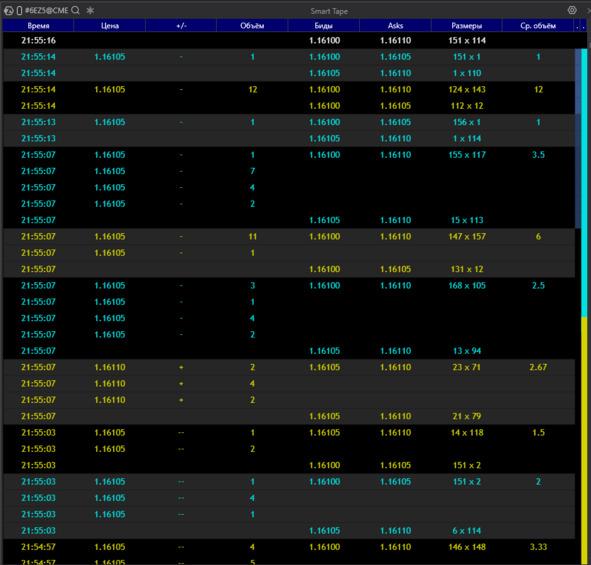
Print tape (T&S):
Definition A row-by-row stream of already executed trades.
Each row represents an execution fact (a match) between an aggressor and a resting limit order.
How to Read the Columns in the Screenshot
— Time — the moment of execution; dense “clusters” of rows indicate bursts or trade series.
— Price — the execution level.
— +/− — tick direction:
— + (uptick, hit on the Ask),
— — (downtick, hit on the Bid),
— — (no price change).
— Volume — trade size (or the summed size of aggregated small prints).
— Bids / Asks — best L1 quotes at the moment of the print (spread context).
— Sizes — visible depth at the best Bid × Ask at the time of execution (e.g., 151 × 114).
— Avg. Volume — average size within the package if the row is aggregated.
Aggregated / “Whole” Rows
— Gray or highlighted blocks with large numbers represent aggregation of prints close in time and price into a single package (volume is summed).
— This is a visual aggregation, not a guarantee of a single counterparty; it is used as a noise filter and for reading execution tempo.
— Series of “+” at the upper quote with a stable Ask → buyer-aggressor hitting the offer; watch whether the spread expands and whether the level holds (absorption / refresh).
— Series of “−” at the lower quote with a stable Bid → seller-aggressor.
— Large packages at one level after a key price is touched → likely a stop flow (sweep / exhaustion).
— Repeated identical sizes in a row → a possible “signature” of a systematic participant or algo.
Why the Tape Matters
The tape shows actual hits on liquidity: where, by which side, and at what pace.
It helps distinguish displayed density in the order book from real interest and capture moments of flips and stop releases.
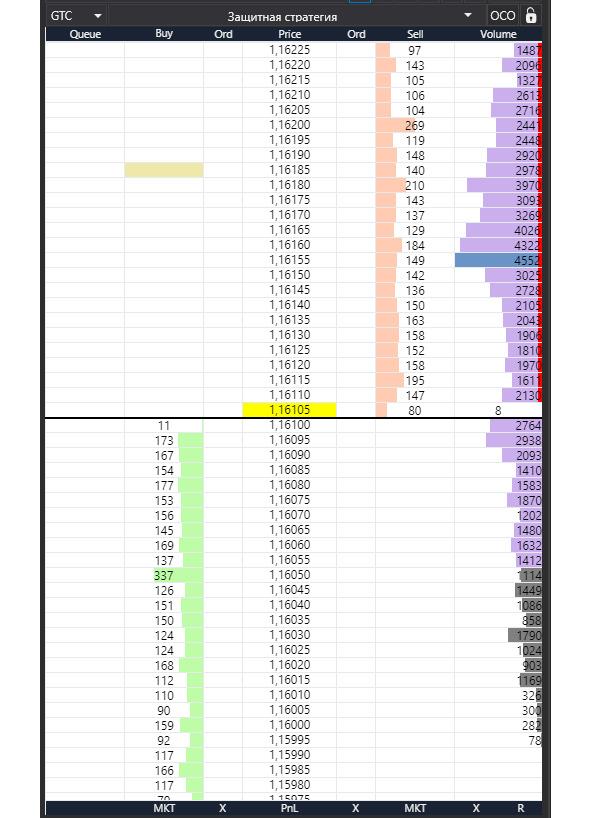
Order Book (DOM / LOB):
What it is.
Two queues of limit orders arranged along a price ladder: Ask (sell orders) on top and Bid (buy orders) below. Between them lies the price ladder itself.
How to Read It on the Screen
— Price — the price scale. The yellow band marks the current price / last print; asks are above it, bids are below.
— Sell / Buy (level volumes) — how many lots are resting as limit orders at each price level. Dense blocks = “walls.”
— Ord / Queue — the number of orders and/or your position in the queue at that level (if the platform provides it).
— Volume histogram on the right — cumulative traded volume by price (volume profile); do not confuse this with resting limit orders.
Key Concepts
— L1 (best quotes) — the top Ask and bottom Bid;
— L2…Ln — depth further away from the market.
— Depth — how many levels are visible / available. The cumulative depth on each side matters most.
— Spread — the difference between Best Ask and Best Bid.
— Narrowing = more liquidity at L1; widening = thin market or aggressive pressure.
— Mid — the midpoint between the best quotes:
— (Best Bid + Best Ask) / 2.
— Useful as a reference axis for pegged orders and balance assessment.
What to Watch First
— Depth asymmetry (significantly more liquidity on one side) → higher probability of price being pulled or a level being defended.
— Walls / “ladders” (repeating volume blocks step by step) → potential reaction zones.
— Pulls / Stacks (rapid cancellations / additions) on L1–L3 → fresh signals of changing intent.
— Interaction with the spread: hits on one side without spread expansion → a sign of aggressor absorption (absorption / refresh).
Trades and Orders
Basic Logic
A trade occurs when an aggressor (a market order or a triggered stop) matches with someone’s limit order in the book (DOM / LOB).
— DOM shows intentions (resting limit orders, depth, queue).
— T&S records execution facts (prints).
1) Market Order
What it does.
Executes immediately at the best available prices until the full size is filled.
When to use.
— Urgent entry/exit (news, breakout, emergency stop, pre-clearing exit).
— Small size in a liquid instrument, when price certainty matters more than fees/impact.
How it appears.
— T&S: a series of prints at Best Ask (buy) or Best Bid (sell); often in bursts.
— DOM: rapid consumption of resting levels; on thin markets the spread may widen.
Pros. Guaranteed and fast execution.
Cons/Risks. Slippage and market impact (especially beyond L1); higher taker fees; on thin books price may sweep several ticks.
2) Limit Order
What it does.
Sets a price you agree to trade at and joins the queue at that level.
When to use.
— Passive entry/exit at a level; fee savings (maker rebates); slippage protection.
— Placing iceberg “steps” for accumulation or distribution.
How it appears.
— DOM: increased volume on your side; formation of a “step” or “wall.”
— T&S: execution only when an aggressor hits your level.
Pros. Price control, possible rebates, lower impact.
Cons/Risks. No execution guarantee; queue risk (you may not get filled), pickup risk (level pulled before touch), partial fills.
3) Stop / Stop-Limit Orders
What they do.
— Stop Market: upon trigger becomes a market order (execution likely, price uncertain).
— Stop Limit: upon trigger becomes a limit order (price control, but fill not guaranteed).
Use cases.
— Protective stops for positions.
— Stop-entries for breakout trades (momentum confirmation).
How it appears.
— T&S: sharp one-directional print series at the trigger level (stop sweep, often with spread expansion).
— DOM: rapid consumption of multiple levels; brief “emptiness” followed by a return → exhaustion sign.
Risks.
— In volatility, Stop Market may cause large slippage.
— Stop-Limit may not fill (price jumps past the limit, no liquidity).
4) Special Order Types
Iceberg
Idea. Only a small visible “cap” is shown; hidden size refreshes after fills.
Where it fits. Accumulation/distribution without advertising size; level defense (aggression absorption).
Signal. Many hits on one side in T&S without price moving; in DOM the visible size persists and refreshes quickly.
Hidden
Idea. Fully invisible in DOM; often lower queue priority versus visible limits.
Where it fits. Stealth entry/exit when not wanting to alert the market.
Signal. Looks like sudden fills “in empty space.”
Pegged
Idea. Price is tied to a reference (Best Bid/Ask or mid) with an offset.
Where it fits. Algo quoting, market making, maintaining ladders without manual re-quoting.
Signal. Frequent auto-repositioning as the reference moves.
5) TIF — Time in Force
— DAY — valid until session end.
— GTC — good till canceled; survives sessions/clearing (“permanent steps”).
— GTD — valid until a specified date/time.
— IOC — fill what’s available immediately, cancel the rest (often not visible in DOM).
— FOK — fill entire size or cancel (precise entries, many rejections).
Practice.
— IOC — probe liquidity without making noise.
— FOK — aggregations/arbitrage where partial fills are unacceptable.
— GTC/GTD — resting levels/steps and “picked on pullback” scenarios.
Common Mistakes
— Using Stop-Limit in high volatility expecting guaranteed protection.
— Advertising large size with a visible limit at an obvious level.
— Ignoring TIF (forgotten GTC orders create “ghost” liquidity).
— Reading DOM without T&S (DOM without tape is half the picture).
Tick / Bar Charts: Tick / Time / Volume / Δ-Volume
Screen context.
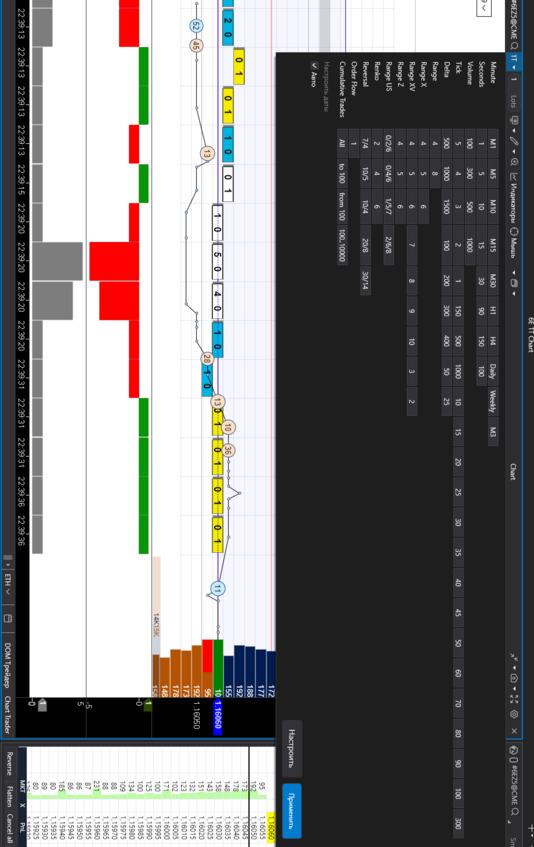
A 1-tick chart is shown; Order Flow (aggregated trades within the bar) overlays it. Below are two indicators: Δ-volume (delta) and Volume. DOM on the right provides liquidity context.
What’s what.
— Tick (1T). Each bar = one trade. Maximum detail without time aggregation; great for detecting aggressor changes and bid-ask bounce.
— Order Flow (bar clusters). Prints aggregated by price/time within the bar; cell numbers = side volumes; color/background shows Bid/Ask hits and distribution.
— Δ-Volume (delta). Buy@Ask — Sell@Bid per bar. Plus/minus shows current aggression; strong delta without price progress → absorption signal.
— Volume. Total participation regardless of side; sleepy areas vs. activity bursts.
Other aggregation methods (for comparison).
— Time bars (1s/1m): good for syncing with news/sessions.
— Volume bars: bar closes after N contracts; normalizes bar “weight.”
— Δ-volume bars: close on delta accumulation; highlight side imbalance.
Practical note.
On fast instruments, 1-tick can be noisy — increase size (e.g., 5T/10T) or switch to Volume/Time bars while keeping Order Flow clusters and the Δ-volume + Volume indicators.
Market Mechanics: Events, Sessions, and Auctions
LOB Events
LOB events are the minimal “atoms” of how the order book operates. Any change in the DOM and any print in T&S is the result of one or more of these events.
1) Add — Order Addition
— What happens: A new limit order joins the queue at a price level.
— How it appears: Volume increases at that price in the DOM, sometimes forming a “step.” Queue position is set by priority (usually FIFO).
— Notes: DAY/GTC affect the “longevity” of steps; pegged and iceberg orders also arrive as add events (visible portion only).
2) Modify — Order Modification
— What happens: An existing order changes price, size, or parameters.
— How it appears: Orders move between levels; partial size increases or decreases.
— Pitfalls: On many exchanges, a price change is effectively cancel + add (queue position is lost). This matters for tactics that try to “reprice without losing the queue.”
3) Cancel — Order Removal
— What happens: An order is partially or fully withdrawn.
— How it appears: Levels “thin out” in the DOM; sometimes rapid pulls at L1–L3 just before a move.
— Signals: Mass, synchronized cancels on the defending side increase the odds of a break; removal of a “wall” often precedes an impulse.
4) Match — Execution (Trade)
— What happens: An aggressor (market/triggered/IOC, etc.) meets a resting limit order from the LOB.
— How it appears: Level volume decreases in the DOM and a line prints in T&S (time/price/size/side). Series of matches without spread expansion can indicate absorption/refresh.
Sessions and Auctions (Impact on DOM/T&S)
Trading Modes
— Pre-open / Pre-market: Orders are accepted, but matching is absent or limited. You see “balancing” — volume accumulation and imbalance shifts.
— Open: The opening auction forms the indicative open price; after the first print the market transitions to continuous trading.
— Intraday (continuous trading): Normal LOB operation (add/modify/cancel/match in real time).
— Close: Closing auction (indicative close price), then clearing.
— Special modes: Volatility auctions/halts, trading pauses, crossing sessions — temporarily switch the market to order accumulation followed by a single match.
Opening/Closing Auctions
— Mechanics: Orders accumulate; the exchange publishes IOP/IOC (indicative open/close price) and imbalance. At auction time, a single large match occurs.
— How it appears: Before the auction, T&S is empty or sparse while the DOM thickens at key prices; at the auction, one or several large prints appear as a block, then normal flow resumes.
— Auction order types: MOO/MOC (market-on-open/close), LOO/LOC (limit-on-open/close), IO orders — participate only in the respective auction.
Time-Based Practical Effects
— Before open/close: Spread and depth behave “abnormally” (often wider/uneven); some liquidity providers filter flow — don’t confuse this with a genuinely thin market.
— During auctions: Large one-off impact and a shift in reference levels are possible; delta/tape signals before the auction are not equivalent to a normal impulse.
Important Nuances for Reading DOM/T&S
— Queue and priority: FIFO vs Pro Rata vs maker-priority/LMM determine who fills first. Changing a limit price often forfeits queue position (modify ≈ cancel + add).
— Latency/aggregation: Data vendors and terminals may aggregate small events; for micro-reading, being able to adjust aggregation is essential.
— Self-trade prevention / cross-match rules: Some opposing orders from the same participant may be canceled or matched specially, affecting tape appearance.
— Regime logic: Trading pauses and volatility corridors alter normal spread/depth dynamics — interpret signals with regime context.
Bottom line: Understanding the four LOB events and the calendar of sessions/auctions explains why DOM/T&S look the way they do — where liquidity is “painted,” where it’s actually taken, and when a “quiet” book is a regime effect rather than participant intent.
Execution Priorities:
Why it matters. Priority determines who gets filled first at the same price level and how fast the queue moves. This directly affects order type selection, TIF, and re-pricing tactics.
1) FIFO (Price – Time, “first come, closer to the front”)
— Rule. Price first; within a level — time of entry. Adding to an existing level puts you at the back; changing price usually loses the queue (modify ≈ cancel + add).
— Implications.
— Visible “walls” are more stable; a large early participant can “hold” a level.
— Tactics: place earlier and don’t fidget; split size into multiple limits so part of it gets closer.
— In DOM/T&S. Slow “chewing” of a level top-down; frequent partial fills for early orders.
2) Pro Rata (proportional)
— Rule. Fills at a level are allocated proportionally to resting sizes (often with minimum quotas and rounding). Variants include pure Pro Rata and Pro Rata with a time tie-break.
— Implications.
— Larger orders receive a bigger share; small ones may “wait forever.”
— Tactics: increase size (or build steps), watch rounding thresholds; re-pricing is penalized less.
— In DOM/T&S. Impact volume is distributed in “chunks” across several participants; less of a single long queue being eaten.
3) Maker-priority / LMM (local market maker)
— Rule. With equal conditions, priority goes to the maker (quote provider) or designated LMM. Sometimes makers receive price/size priority or “match-at-set” privileges.
— Implications.
— A regular participant may lose fills to a maker even at equal price/time.
— Tactics: don’t assume perfect equality; work a tick better (inside), look for time/size niches.
— In DOM/T&S. You’ll often see “someone” getting filled first — even when visible queues look equal.
Practical notes
— Re-pricing = queue loss in FIFO (less critical in Pro Rata). Adding a new step is often better than jumping a single order.
— Size splitting. Helps in FIFO to occupy multiple queue positions; in Pro Rata, consolidation is often better.
— TIF effects. IOC/FOK don’t form long queues and often bypass parts of priority logic (fill or disappear).
— Hybrid rules. Exchanges use hybrids: Price – Time with Pro Rata on some instruments/sessions, or Pro Rata with time tie-breaks. Check the venue spec for your contract.
— Hidden/Iceberg. Hidden orders usually have lower priority at the level; an iceberg’s “tip” ranks like a normal limit — each refresh gets a new timestamp.
You are holding a book about seeing the market from the inside — at the level of orders, queues, and trades. There’s little room here for guesswork or pretty pictures, but a lot of specifics: what exactly happens in the order book, who hits the market, how the balance of power shifts, and why the same volume can produce different outcomes. One simple request: read not to confirm familiar ideas, but to test hypotheses against facts.
Let’s agree on the approach from the start. Every observation in this book is meant to be verifiable: you should be able to reproduce it in your terminal, on the tape, and on the chart. If a rule can’t be rechecked in replay, it’s not a rule — it’s an opinion. Keep your tools ready: DOM/LOB, T&S, tick/volume aggregations, and a trade journal. Pause, slow-motion, rewind — these are your best friends.
Don’t look for “signals forever.” Microstructure changes across instruments and sessions. The same patterns behave differently with other liquidity, tick sizes, and priority algorithms. We deliberately show counterexamples and invalidation conditions — use them to avoid overfitting to two lucky screenshots.
Discipline matters more than talent. Limit risk to a size that lets you stay objective; trade small until you can reproduce results; separate execution from evaluation — follow the plan first, analyze mistakes later. Above all, respect the market: it doesn’t owe us confirmation of our expectations, and that’s exactly what makes the craft of trading interesting.
If you’re ready to see price movement not as a sequence of candles but as a chain of human and machine decisions, this book will repay your time. Open the terminal, turn on replay, and verify every idea with your own eyes. Let the following pages become tools, not decorations.
.
Market Data Analysis Platform

Basic Workspace Templates for the Analysis Platform

.
Chapter 1 ● Glass Mechanics
In this chapter, we descend into the “engine” of price — the Limit Order Book (LOB). This is where the best Bid/Ask quotes are formed, the spread is born, the mid price is calculated, and the minimum step of movement is measured in ticks. We will examine not only what is visible in the DOM, but also how it actually works: how orders enter the queue, under which rules they are executed, and why the same volume can produce different price outcomes.
Next, we will study market depth and its asymmetries, the recognition of “walls” and “ladders” (stacked liquidity), as well as the dynamics of additions and cancellations that set the tone for the next move. We will conclude with the key tool of the chapter — the queue imbalance across levels (L1–L10) and microprice as an estimate of the subtle tilt of the “market scales” between buyers and sellers.
The practical goal of this chapter is to learn how to read the DOM quantitatively: to distinguish displayed liquidity from real liquidity, to understand where you are in the queue and how fast it moves, and to turn local imbalances into concrete decisions — enter / hold / cancel.
Quotation Book (Bid/Ask), Spread, Mid, Price Tick
In the illustration: on the left, a 10-tick chart with a footprint and an overlaid DOM; on the right, a Smart DOM with limit orders and columns showing changes.
A) Bid/Ask and the Price Ladder
Price ladder. A vertical price scale with a discrete step (tick size). Each row is a possible execution level. The ladder defines the “grid” along which price can move: not by half a tick and not “in between” — only in multiples of the tick.
Best Bid (L1 Bid). The highest price buyers are currently willing to pay. This is the edge of the buy queue: if someone sells at market, execution starts here. The thicker the volume at L1 Bid, the larger the downside “cushion” — but only until it is pulled or consumed.
Best Ask (L1 Ask). The lowest price sellers are willing to accept. Any market buy will start matching here. Watch how often L1 Ask refreshes after hits — this hints at iceberg/absorption.
L2…Ln — depth. Subsequent levels on both sides. They form the near-term context: where “ladders” (repeating volume blocks) sit, where gaps appear, and where liquidity thins. Cumulative depth over the nearest 3–5 levels gives a sense of the local “heaviness” of price.
Level queue. At each level, limit orders line up according to exchange rules (often FIFO: price – time). First in, first filled. Change the price and you usually lose your place (modification = cancel + add). Hence the tactic: if queue position matters, avoid frequent changes; split size across multiple orders.
How this shows up in data
— Aggressive buying → matches occur on the Ask; volume at that level in the DOM decreases; the footprint prints “at Ask.”
— Aggressive selling → matches on the Bid; the tape shows “at Bid” prints.
— If a series of buys occurs while the Ask holds and the spread doesn’t widen → likely refresh/absorption. If, at the same time, upper levels are being pulled → prepare for an upside “poke.”
B) Spread and Mid
Spread = Ask₁ — Bid₁. The minimum gap between best quotes. On liquid contracts it often stays at 1 tick, but can instantly widen if:
— limits are pulled,
— the market receives a burst of aggression (market/stop flow),
— liquidity drops (session transitions, pauses, news).
Mid = (Bid₁ + Ask₁) /2. A convenient axis of short-term equilibrium. Relative to mid, bias is easy to see: persistent trading above → buyer dominance; below → seller dominance. Many pegged orders follow the mid, hence frequent micro-rearrangements at L1.
Reading spread dynamics
— Tightening to 1 tick with stable depth → a “dense” market, low entry costs; easier to build with limits.
— Choppy/wide spread (2–3 ticks or more) → thin book: expect more slippage; split size or switch to algorithmic execution.
— Tightening during buying without price movement → absorption: the Ask takes hits and refreshes.
— Widening with a print series → likely level break: limits leave, the aggressor probes the ladder.
Execution implications
— Narrow spread favors passive limits (maker rebates, lower impact).
— Wide spread favors small IOC/market slices; otherwise price control is lost.
— “1-tick stop” plans on variable-spread instruments are unrealistic: the stop can trigger on spread breathing alone.
Common mistakes
— Judging “side strength” from a single spread change while ignoring the tape.
— Confusing temporary news/auction widening with true liquidity weakness.
— Forgetting that mid can move without prints due to L1 reshuffling, not real flow.
C) Tick Size and Tick Value
Tick size. The minimum price increment. Price moves only in multiples of this step (discrete ladder). Examples: 0.25, 0.1, 0.005—instrument/exchange specific.
Tick value. The monetary value of one tick per contract, set by the contract spec (multiplier).
Examples
— Step = 0.25, multiplier = $50/point → 1 tick = 0.25 × $50 = $12.50.
— Step = 0.005, multiplier = €125,000/point → 1 tick = 0.005 × €125,000 = €625.
Why it matters
— Risk planning. Stops/targets in ticks; capital in money via tick value.
— Risk ($) = stop ticks × tick value × contracts.
— Setup realism. If average “breathing” noise is 2–3 ticks, a 1-tick stop will be hit statistically.
— Instrument comparison. Same tick size can mean different tick value → different cost of the same move.
— Commissions and spread. Minimum entry cost ≈ spread (ticks) × tick value + commission. With a 1-tick spread, entry “costs” one tick (ex-commissions).
Practical rules
— Stop <average intrabar noise (ticks) → near-certain stop-out.
— Targets <2× spread rarely cover commissions/impact on fast instruments.
— Switching contracts? Recalculate tick value — same ticks yield different P&L.
Common mistakes
— Assuming “1 tick = little money” without the multiplier — some futures have expensive ticks.
— Copying stops/targets between instruments unchanged.
— Ignoring that with a wide spread, initial drawdown already equals ≥1 tick before the first favorable print.
D) DOM Columns and Change Columns
Bid / Ask. Visible limit liquidity by price level. Thick numbers/bars are “walls”; thin ones are gaps. Remember: these are intentions, not trades; they can vanish (pull) in milliseconds.
Price. Tick-sized price scale. Read relative positioning: L1 (best), L2–Ln (depth). Jumps between rows without tape prints are usually limit reshuffles, not real trading.
Chg (Change). Volume change at a level since the previous update:
— Plus → stack (limits added; level strengthened).
— Minus → pull (limits removed; level weakened).
— Series of pulls on the defending side alongside aggressor prints there → strong signal the level may give way. Series of stacks often precede stalling or absorption.
Ord / Queue (if enabled). Number of orders/queue position — useful for limit tactics:
— FIFO: early placement matters (don’t “twitch” the price or you lose priority).
— Pro Rata: larger size helps participation; time priority matters less.
What this adds to DOM reading
— Pulls on L1–L3 + one-directional T&S prints → the level likely yields (liquidity flees).
— Stacks on L1–L2 with steady prints and a non-widening spread → absorption/refresh (the level is defended).
— Bid/Ask imbalance across L1–L5 with Chg spikes on one side → short-term depth imbalance (entry/cancel context).
Frequent errors
— Treating any large Bid/Ask as an immovable wall — check Chg and tape; it may be “painted.”
— Reading a disappearing level as a reversal — often it’s just a cancel+add higher/lower.
— Ignoring the queue: a limit at the tail of an active level may not fill despite big displayed size.
E) Footprint and Overlaid DOM
Footprint. Shows actual execution by price within each bar: how much traded on Bid vs Ask, micro-series of prints, volume distribution by level. It’s the X-ray of trades — facts, not intentions.
Overlaid DOM. Displays visible liquidity (limits) at the same price levels directly on the chart, letting you see where orders stood and where aggression hit.
Reading them together
— Absorption / refresh. Many Ask prints with a steady L1 Ask and no spread widening → the offer absorbs buyers (iceberg/refresh). Same for Bid.
— Thin pass (level poke). Fast pulls on Ask L1–L2 + a buy series in the footprint → high odds of an upside probe (the ladder empties). Mirror for Bid.
— “Noise without progress.” High Ask delta in the footprint but no price advance and Ask doesn’t move → seller accumulation; often precedes a pullback.
— Quiet progress. Modest Ask volumes with steady upward stepping and rare seller pulls → thin advance without resistance.
Practical notes
— Compare cluster volumes to DOM changes. A large Ask cluster + zero/positive Chg on Ask L1 is a strong absorption signal.
— Mind tape aggregation: with clustering on, “packages” look larger — don’t assume a single participant.
— Context beats a single bar: check 2–3 neighbors; persistence matters more than a spike.
F) Mini-Metrics
Top-5 depth (by side). Cumulative visible liquidity at L1–L5 on Bid and Ask — near-term “weight”:
— High Top-5 on the sell side with average demand → likely overhead cap.
— Symmetrically, high Bid Top-5 → downside cushion.
— Watch the rate of change (how fast it melts/builds every 1–3 seconds) — more important than a static snapshot.
ΔDepth = ΣBid (L1–L5) — ΣAsk (L1–L5). A coarse local book imbalance:
— ΔDepth> 0 → near zone heavier below (relative buyer advantage).
— ΔDepth <0 → seller advantage.
— Significance depends on the instrument: use historical σ of ΔDepth for your timeframe; signal when |Δ| exceeds ~1–1.5σ and persists for 2–3 updates.
Spread state {tight/normal/wide}. Classify spread in ticks to gauge expected slippage and execution mode:
— Tight: = 1 tick (or historical minimum). Easier limit entries, lower impact — good for “thin” entries/adds.
— Normal: typical for the session — balance limits with partial IOC.
— Wide: ≥ 2–3 ticks or above historical median +1σ. Expect more slippage; split size, prefer algos (IOC/FOK/TWAP) or delay entry.
Putting it together
— If ΔDepth ≫ 0, spread tight, and Bid Top-5 stays high → passive buys (limits) make sense with a short stop beyond the nearest depth “kink.”
— If ΔDepth ≪ 0, spread wide, Ask Top-5 building, and the tape shows serial sells → aggressive buying is unattractive; wait for pullback/absorption.
— A sharp ΔDepth shift with simultaneous spread widening → liquidity sweep; assess thin-pass risk and avoid 1–2 tick stops.
Notes
— Metrics see only visible liquidity; icebergs/hidden orders can distort — confirm with the tape.
— Track trends, not single values (3–5 updates): persistence signals, single spikes are noise.
— Normalize by time of day/session: nights are thinner; signal thresholds should be softer.
Summary
— The order book is a map of intentions (Bid/Ask, depth, queue). The tape/footprint are execution facts (who hits, where, and at what pace).
— Spread, mid, and tick size define the working price grid where stacks/pulls, queue speed, and local imbalances are read.
— DOM provides context (depth, level changes), T&S shows aggression and tempo, footprint shows intrabar print distribution.
— Chain signals as: context → trigger → confirmation → cancellation.
Coordinated reading of these three sources enables better micro-horizon decisions — entry/hold/cancel — while improving control of risk, impact, and slippage.
Request queue and execution priorities
In the Limit Order Book (LOB), each price level contains a queue of limit orders. This is a living queue: some orders arrive, others change parameters, others are canceled, and still others are executed when the opposite side “hits” them. Below is how this works and how it appears on screen in the DOM (order book) and in T&S (time & sales).
Four basic order actions
• Add — a new limit order appears at a specific price level.
In the DOM, the number of lots at that level increases. Nothing appears in T&S because no trade has occurred yet.
• Modify — an order is adjusted: price and/or size is changed, or its “time-in-force” is extended.
This may look like the order disappeared at one level and appeared at another (many exchanges treat a price change as “cancel + add,” i.e., a loss of queue position). In the DOM this shows as volume shifting between levels; T&S remains empty (no trade).
• Cancel — an order is partially or fully removed from the queue.
In the DOM, volume at the level decreases without any corresponding prints in T&S. If numbers thin quickly across several nearby levels at once, these are mass cancellations (pulls).
• Match (execution) — an aggressive order arrives (market order or triggered stop) and meets a limit order.
In the DOM, volume at the level decreases; in T&S a trade line appears (time, price, size, side — at Bid or at Ask). Multiple consecutive lines form an execution “burst.”
In short: the DOM shows intentions (add/modify/cancel), while T&S shows execution facts (matches).
Why this matters for understanding the queue
— Dozens of orders from different participants can sit at the same level. Execution order depends on priority rules (e.g., “first in — first out”).
— The speed at which the queue “moves” depends on two flows:
— how much aggression arrives (how many trades print in T&S at that level),
— how fast limit orders are canceled/added (seen in the DOM as volume changes).
— If volume disappears from the DOM with no trades in T&S, the level was canceled, not “eaten.”
— If trades print in T&S while volume at the level keeps replenishing, someone is absorbing the flow (often an iceberg/level refresh).
This grounded view — what exactly happened: added, modified, canceled, or executed — is the foundation for reading the queue and participant behavior without guesswork.
A) How the queue works at a level
Unit of observation: a price level (a row in the DOM). At any moment, dozens or even hundreds of limit orders from different participants sit there. It’s a living queue: orders are added, canceled, or executed.
Queue position (“who is closer to the cashier”)
— Determined by the exchange’s priority rules. In the classic FIFO (price – time) model, whoever placed the limit order earlier gets filled first.
— If a participant changes price, many exchanges treat it as cancel + add → the order loses its place in the queue.
How aggression “eats” the queue
— When an aggressive order arrives (market buy/sell, triggered stop, or IOC), it matches with the first limit order in the queue on the relevant side (Ask for buys, Bid for sells).
— The earliest limit order fills first, then the next one — the level is “eaten from the top” until the aggressive size is exhausted or the next price is reached.
Partial fills
— A large limit order can be filled in pieces: part of the size is executed, and the remainder stays in its place in the queue (it is not pushed back).
— In the DOM this appears as a gradual decrease in volume at the level; in T&S as multiple trade lines at the same price.
Queue speed (why it’s sometimes fast and sometimes “sticky”)
Two flows determine it:
— Matches — how much and how fast aggression hits (trade series in T&S at that level).
— Limit changes (pull/stack) — how quickly orders are canceled (pull = volume decreases without trades) and how quickly new orders are added (stack = volume increases without trades).
Simply put: many trades and few cancellations → the queue advances quickly; few trades and many cancellations → the level “melts” and runs away from the hit.
What you see in the data
— In the DOM: volume decreases on execution, increases on adds, and decreases without trades on cancellations.
— In T&S: each line is a trade (time, price, size). A series of lines at one price means the queue is truly being consumed by aggression.
— If DOM volume shrinks while T&S shows few or no prints, it was a limit outflow (cancellations), not real buying/selling at that price — traders say the level “ran away from the hit.”
Mini example (Ask side)
— Ask L1 shows 500 lots. An aggressive buyer for 300 lots arrives.
— — T&S prints a series of trades at the Ask; in the DOM Ask L1 drops from 500 → ~200.
— Next, several participants cancel orders (fearing continuation).
— — In the DOM Ask L1 falls from ~200 → 120, with no new trades in T&S — these are cancellations, not new buys.
— Another participant refreshes the level (adds an iceberg “cap”).
— — In the DOM Ask L1 rises from 120 → 180 without trades — this is an add (stack/refresh).
This perspective lets you distinguish what was truly consumed by aggression, what was pulled manually, and who is replenishing the level — revealing the live mechanics of the queue rather than just a static number in the book.
B) Roles and typical behavior of participants in the queue
1) Liquidity providers (LPs / market makers / HFTs)
What they do.
They keep the market “smooth”: continuously place limit orders near the best prices (L1) and rapidly re-price them at the slightest change in balance.
Why.
They earn the spread and rebates (fees for providing liquidity) and try to avoid adverse selection — being picked off right before a sharp move.
How it looks:
— DOM: frequent refreshes near L1—volume disappears and reappears in the same “chunks.”
— T&S: when strong aggression shows up, they synchronously pull the first steps (pulls at L1–L2) to avoid getting caught in the impulse.
— Visual tell: “blinking” levels near price and rapid re-positioning — typical LP algorithms.
2) Inventory traders and funds (holding a position/defending a level)
What they do.
Place large limit sizes at preselected levels (support/resistance), sometimes as a “ladder” — stepped across several prices.
Why.
Either to build/unwind a position with minimal price impact, or to defend a level that matters to them.
How it looks:
— DOM: visible “steps” or “walls” (stacked liquidity) — notable blocks of size across consecutive prices.
— T&S: when the level is hit, you often see partial replenishment (iceberg/refresh) rather than a single huge visible order.
— Visual tell: the level “holds” through a series of prints without the spread widening — price seems to lean on it while volume at the level self-replenishes.
3) Aggressors (taker algos, stop flows, arbitrage)
Aggressors are participants who initiate trades, hitting resting limit orders “through the market.” Speed of execution matters more to them than getting the perfect price. In tape terms, these are takers (market/triggered orders, IOC/FOK).
What they do.
They go “through the market”: first they probe liquidity with a small size (a market/IOC ping), then they hit with the main size.
Why.
They need fast execution and level traversal — for example, to enter on momentum, reduce risk, or complete an arbitrage.
How it looks:
— T&S: a series of rapid prints in one direction (on the Ask = buying, on the Bid = selling).
— DOM: defensive levels thin out (pulls), the spread often widens; when the “ladder” empties, the aggressor sweeps several ticks at once.
— Visual tell: a one-directional “volley” of trades and fading nearby steps with little visible replenishment.
Who can be an aggressor
— Algo takers: momentum/arbitrage/news; they IOC-ping first, then scale the hit.
— Stop flows: triggered stops convert into one-sided market flow.
— Liquidations/margin calls: forced position closures.
— Manual traders/funds: urgent entry/exit (risk limits, deadlines, rebalancing).
Why they hit aggressively
— Lock in price now (avoid missing entry/exit).
— Break a level / ignite a move (impulse, breakout).
— Close an arbitrage (temporary quote/spread dislocations).
— Execute a forced action (stops/liquidations).
How aggressors appear in the data
— T&S (tape): one-sided print streaks:
— — on the Ask → buying aggressor;
— — on the Bid → selling aggressor.
— Often seen as clustered “volleys,” sometimes with repeating sizes (algo signature).
— DOM: the defending side thins at L1–L3 (pulls), the spread often widens; with an emptying ladder, price sweeps multiple ticks in sequence.
Typical sequences
— IOC ping → size hit. Small liquidity test, then a series of larger prints.
— Stop cascade. Price tags stop levels → avalanche of one-sided trades → brief multi-tick sweep.
— Arb sweep. Fast removal of visible steps without prolonged battle, then stabilization near the new price.
What stops an aggressor
— Absorption/refresh. An iceberg sits at the level: trades print, but price doesn’t move and the spread doesn’t widen.
— Counter-pressure. After sweeping a few ticks, dense opposing liquidity appears and price snaps back (exhaustion).
Risks for aggressors
— Impact and slippage: the thinner the book, the more expensive the hit.
— False breakouts: price quickly returns after stops are cleared.
— Intent leakage: predictable size sequences can be detected by counterparties.
How to spot them “at a glance”
— Tape: rhythmic one-sided print series, sometimes with increasing size.
— DOM: synchronous pulls of nearby defensive levels and spread expansion.
— After the hit: either continued sliding along an empty ladder, or stalling at a level (ran into absorption).
In short: an aggressor pays for speed. Their footprint is a stream of one-directional prints in T&S and “melting” steps in the DOM.
4) Hidden players (hidden / iceberg)
What they do.
They conceal true size. Hidden orders are completely invisible in the book; icebergs show only a small “tip” and replenish it upon execution.
Why.
To avoid signaling large interest and spooking the market; to work against aggression without revealing full size.
How it looks:
— T&S: prolonged absorption at one level — prints keep coming, price holds, and the spread doesn’t widen.
— DOM: visible size is small, yet after print streaks it reappears (refresh), as if the level has “a second wind.”
— Visual tell: a visually “thin” level inexplicably holds heavy flow — often an iceberg.
How the roles interact
— LPs create a thin liquidity “crust” at L1 and quickly step aside when they sense aggressor impulse.
— Inventory players build a deeper “skeleton” of steps, sometimes absorbing flow via icebergs.
— Aggressors test the crust and, seeing pulls, escalate to sweep several prices.
— Hidden players mask true depth, so the tape may show strong flow without price movement.
What they are
— Hidden: fully invisible order; size is not displayed but can suddenly execute when hit. Often lower priority than visible limits at the same price.
— Iceberg: only a small visible tip; when the tip is filled, it automatically refreshes with another small slice.
Why they use them
— Avoid revealing intent/size (no front-running).
— Reduce impact by gradually building/unwinding size.
— Defend a level without advertising a huge visible wall.
How this appears in data
— T&S: extended one-directional execution at a single price; trades print, spread stays tight, price barely moves — someone is absorbing.
— DOM: modest visible size that repeatedly returns to similar values (iceberg); with hidden orders it may look like “no level” until executions suddenly appear.
— Behavioral markers:
— repeating identical tips (e.g., 20 → 0 → 20 → 0) — classic iceberg refresh;
— no spread expansion despite heavy trade flow — absorption by hidden size.
Typical scenarios
— Seller accumulation on the Ask. Buyer keeps hitting the Ask; prints pile up, Ask holds and refreshes — an iceberg/hidden sits on the Ask.
— Bid defense. Sales slam into the Bid, but price doesn’t break — hidden size is holding the Bid.
— False break and return. After a brief sweep, price returns to the same level — hidden player continues absorbing.
Observed tactics
— Split execution into many small trades instead of one large print.
— Keep the visible tip minimally noticeable to avoid attracting aggression.
— Re-price when momentum turns clearly adverse (to avoid being overrun).
Risks and limits
— Adverse selection: strong momentum can still punch through an iceberg, forcing worse fills on the remainder.
— Lower priority for hidden: at equal prices, fills may come after visible limits.
— Pattern detectability: experienced participants recognize refresh behavior and adjust aggression.
Common misconceptions
— “If there’s little size in the DOM, the level doesn’t exist.” False — hidden orders can make a level much thicker than it appears. Check the tape.
— “A big wall always means defense.” Often the opposite: a small visible tip plus sustained absorption is a more reliable sign of real support/resistance.
In short: hidden/iceberg orders let you be large while staying invisible. Their footprint is prolonged single-level execution in T&S with a stable level in the DOM and no spread expansion.
That’s why DOM and T&S must be read together: the book shows who and where is standing, while the tape shows who is actually hitting and who is absorbing.
C) Execution Priority: How “Who Goes First” Is Decided
Priority is the rule by which an exchange decides whose limit order is filled first when aggression hits a price level. It shapes participants’ tactics and how the queue appears in DOM/T&S.
1) FIFO (price – time)
Logic (plain language).
First, price is compared: the better bid/ask is closer to execution.
If the price is the same, the order that was placed earlier is filled first.
Change the price — and in most cases you’re treated as canceled and re-added → you lose your place.
How participants behave.
— Try to get in early and avoid moving the order unnecessarily.
— Often split size across multiple limit orders (so part of it sits closer to the front).
— Move price only when clearly necessary, aware of the risk of falling to the back of the queue.
How it looks in the data.
— In T&S, you see series of prints at one level; in DOM, size decreases smoothly — as if a long “sausage” of orders is being chewed through.
— After a “modify,” size may vanish at one price and reappear at a neighboring tick — effectively cancel+add and loss of queue position.
2) Pro Rata (proportional)
Logic.
When aggression hits a level, the exchange allocates fills proportionally to the sizes of resting limit orders (often with minimum quotas and rounding). A time tie-break may apply if proportions are equal.
How participants behave.
— Increase order size (or consolidate orders) to secure a larger share of fills.
— Less sensitive to placement time: size matters more than “who was first.”
— Watch rounding thresholds: adding a few lots can yield a disproportionately larger allocation.
How it looks in the data.
— On impact, T&S often shows a batch of fills split into “chunks” among several counterparties.
— In DOM, size may drop in steps rather than continuously — reflecting the allocation.
3) Maker Priority / LMM (Local Market Maker)
Logic.
All else equal, priority goes to the maker (liquidity provider) or an exchange-designated LMM. They may be allowed to match slightly earlier, or receive priority when price and time are equal.
How participants behave.
— Non-makers often need to step one tick better (sometimes inside the spread if midpoint/pegged orders are allowed), or look for time/size “windows” where competing with the maker is harder.
— Makers actively refresh quotes and maintain presence to preserve the privilege.
How it looks in the data.
— It feels like “someone” consistently gets filled first under equal conditions.
— Near L1, quotes often “blink” rapidly — a sign of maker quote maintenance.
Hybrid regimes (why the picture doesn’t always add up)
In practice, exchanges frequently use mixed rules:
— Price – time with a size tie-break,
— Pro Rata with a time tie-break,
— Maker priority layered over FIFO/Pro Rata,
— Separate regimes for auctions or volatility halts.
Practical takeaway.
Even if the DOM looks identical, execution outcomes can differ: one participant may consistently get filled first due to hidden tie-breaks or maker status. That’s normal for a given venue and instrument.
Quick visual cues by priority type
— FIFO: a long “sausage” of orders at a level; smooth top-down consumption; high sensitivity to price changes (queue loss).
— Pro Rata: fills distributed to multiple parties at once; order size strongly affects share; repositioning hurts less.
— Maker/LMM: frequent quote refreshes near the best price, and “someone” always ahead under equal conditions.
Understanding priority explains why some levels “hold” while others “give way,” and why the same execution tactic yields different results across markets.
D) How add / modify / cancel / match Change the Queue
These are the four basic actions applied to limit orders. Below is a plain-language explanation of what happens, how it appears in the order book (DOM) and the tape (T&S), and what it means for queue position.
1) add — a new limit order is placed
— What happens: a fresh order appears at the level; the level becomes “heavier.”
— How it looks: in the DOM, size at that price increases (often marked as a stack or positive change). Nothing prints in T&S because no trade occurred.
— Queue meaning: the new order joins the back of the queue at that level (under FIFO). If, after a series of trades, size grows again, this is a refresh (the level is being replenished; often a sign of an iceberg).
2) modify — an existing limit order is changed
— What happens: the participant changes the price and/or size of an order.
— How it looks: most often it appears as “size decreased at one price and increased at a neighboring price,” with no trades in T&S.
— Queue meaning: on many exchanges, a price change equals cancel+add, meaning you lose your queue position (in FIFO you fall to the back). Frequent price “twitching” therefore worsens fill probability.
3) cancel — a limit order is fully or partially removed
— What happens: the order is withdrawn from the level, entirely or in part.
— How it looks: in the DOM, size decreases without trades (negative change = pull). T&S remains empty.
— Queue meaning: the level becomes thinner. Synchronous pulls on L1–L3 on the defending side often foreshadow a pass-through: liquidity is “running away” from an incoming hit.
4) match — a trade (execution) occurs
— What happens: an aggressive order arrives and consumes the front of the queue at that level.
— How it looks: DOM size drops, and T&S prints trades (time, price, size, Bid/Ask side).
— Queue meaning: the queue advances — earlier orders are filled. Many matches at one level with a stable spread often indicate absorption/refresh: someone is taking the flow and replenishing the level.
A short “timeline” of one level (Ask side example)
— add: Ask L1 grows from 180 → 230 lots (no trades) — liquidity is added.
— match: buying begins; T&S prints Ask trades, DOM falls 230 → 140.
— add/refresh: a second later Ask is back to ~200 — the level is replenished (possible iceberg).
— cancel: ahead of a new impulse Ask suddenly drops 200 → 90 with no prints — mass pull.
— match: a burst of buys arrives, the level is pierced, price moves one tick higher.
This cycle is the queue’s “breathing”: add → cancel → match → refresh. By reading which action dominates at the moment (stacks, pulls, or matches), you can tell who is in control: those standing and absorbing flow, or those hitting and pushing the level through.
E) The Queue “in Motion”: Observable Effects
1) Level “sticking” (stalling)
Essence. Long series of trades go through at one price, yet the level does not move.
Signs:
— T&S: many consecutive prints at the Ask (for buying) or at the Bid (for selling).
— DOM: size at L1 decreases and immediately restores (refresh); the spread does not widen.
What it means. A participant with hidden/iceberg volume is standing at the level and absorbing aggression.
Context / risks. Prolonged stalling often ends either with a level break once the hidden volume is exhausted, or with a reversal if the aggressor runs out of steam.
2) “Empty pass-through”
Essence. Price “rings through” several ticks almost without resistance.
Signs:
— DOM: simultaneous pulls on the defending side (L1–L3 thin out quickly with no trades).
— T&S: a series of one-directional prints; the spread often widens.
What it means. Liquidity is fleeing the hit; the defending side does not want to get filled — the level gives way.
Context / risks. After a fast breakout, a brief pause or pullback (exhaustion) often follows. Check whether limit orders return to the level.
3) “Queue corridor”
Essence. Two active sides near the best price rapidly replenish levels, keeping the spread tight.
Signs:
— DOM: L1–L2 on both sides are constantly replenished (small, frequent stacks); the levels “flicker.”
— T&S: trades print, but price progress is weak — bar after bar with no clear displacement.
What it means. Two liquidity providers (or two families of algorithms) are maintaining balance: execution occurs, but price stays put.
Context / risks. This regime is easily broken by news or a large aggressor; exits from the corridor are usually sharp.
How to quickly distinguish these regimes
— Sticking: trades occur → the spread stays stable → the level is replenished.
— Empty pass: trades occur → the spread widens → levels disappear without prints.
— Corridor: trades occur → the spread is tight → levels on both sides are quickly replenished, with no price progress.
Common observation mistakes
— Confusing refresh (level replenishment after trades) with a “painted” wall: check T&S — with refresh there are trades; with “painting” there often aren’t.
— Treating any fast breakout as “strong” without checking whether liquidity returns after the sweep (exhaustion).
— Judging a static DOM snapshot: speed of stack/pull matters more than raw numbers.
These three pictures are everyday patterns of queue life. Seeing them in real time tells you who is acting now: absorbing, running away, or balancing.
What traders should watch: fast cues and recognizable scenes
1) Four things you constantly check
— How fast L1 melts.
— Eyeball it: do the first tens/hundreds of lots disappear in seconds, or do they hold?
— Melts fast → defense is weak.
— Holds → someone is absorbing flow.
— Repeated “resurrections” of a level (refresh).
— Count cycles of “hit → replenished.”
— 0–1 time → little real defense.
— 3+ in a row → likely iceberg/hidden volume.
— Where the weight is near price (L1–L5).
— Is there more cumulative size on Bid or Ask? Watch how weight shifts every 1–3 seconds.
— Weight shifts down (Bid) → support from below.
— Weight drains above (Ask) → the cap is thinning.
— Spread regime (tight / normal / wide).
— Tight (~1 tick) → cheap execution; multi-tick sweeps are rarer.
— Wide (≥2–3 ticks) → thin book; price is easy to push; expect more slippage.
2) Three scenes you learn to recognize in seconds
A. “Protective cap” (absorption)
— T&S: long series of buys at the Ask (or sells at the Bid).
— DOM: L1 replenishes after each hit; the spread does not widen.
— Conclusion: hidden/iceberg volume is present.
— Detail: many refresh cycles, slow L1 decay, weight stays on the defending side.
B. “Support break” (empty pass)
— T&S: accelerating one-sided prints.
— DOM: synchronized pulls on the defending side (L1–L3); wider spread.
— Conclusion: liquidity is running; the level gives way; a multi-tick sweep is possible.
— Detail: L1 melts fast, almost no refresh, weight vanishes where pressure hits.
C. “Queue corridor” (two-provider balance)
— T&S: trades print, but price makes little progress.
— DOM: both sides’ L1–L2 are frequently replenished in small amounts; tight spread.
— Conclusion: two active models hold equilibrium; the regime is fragile — news or a large hit can break it.
— Detail: mirrored replenishments, stable weight on both sides.
3) Mini-algorithm for scanning T&S and DOM (every 5–10 seconds)
— Spread: tight or wide? (costs and sweep risk)
— L1: melting fast or holding? any refresh cycles?
— L1–L5: where is weight shifting — toward Bid or Ask?
— Scene: “cap,” “break,” or “corridor”?
If you get:
— Tight spread + many refreshes + weight on defense → cap.
— Wide spread + pulls on defense + fast melting → support break.
— Tight spread + mirrored replenishments + no progress → corridor.
4) Common mistakes and how to avoid them
— Judging by a static number. Watch volume motion (stack/pull/match), not snapshots.
— Confusing cancels with executions. If volume drops but there are no prints, it’s a cancel, not consumption.
— Ignoring the spread. A wide spread alone can produce “false” 1–2 tick pokes.
— Not counting cycles. Two or three refreshes in a row are a signal; a single one is just noise.
Watch these four cues and cross-check with the tape — and the queue stops being abstract: you’ll see who is acting in the moment.
Conclusion
The queue is a mechanism for allocating executions among limit orders at a price level. Participants compete by time, size, and status (maker vs. non-maker), not by “being right.” Queue behavior is the result of their choices to add, remove, refresh, or absorb. By understanding priority rules and the dynamics of add/modify/cancel/match, we read participants’ intentions and risks before price moves — and see where a level is truly defended versus where it is only thin in a snapshot.
Market depth, liquidity asymmetry, walls and “ladders” (stacked liquidity)
The order book is not just the best L1 quotes, but the fabric of liquidity surrounding price: tiers of limit orders up and down the price ladder. The shape of this fabric (where it is dense or sparse), its skew between Bid and Ask, and pockets of large concentrations (“walls,” “ladders”) indicate where the market becomes heavy and slows down — and where it thins out and is ready to “sweep” ticks with little resistance.
Think of depth as a suspension bridge under price: if there are more planks on the left (a thicker Bid), the bridge holds from below; if there are gaps on the right (a thin Ask), a step in that direction can produce a long “drop.” Large volume blocks are the bridge’s supports: some truly hold (willing to execute and refresh), others merely imitate support (they vanish on the first hit).
Dynamics matter: not the size itself, but how it changes under the tape’s pressure. If a level replenishes after hits, it is absorbing flow; if tiers wither synchronously before any trades, liquidity is running from the impact. This micro-mechanics is how we read “where it’s easier to go right now.”
And remember the limits of the picture: visible depth reflects intentions, not completed trades; some volume may be hidden (iceberg/hidden); session regime and spread width change the “cost of passage.” Therefore, read depth together with the tape and in real time, tracking the speed of stack/pull/match — only then does the book’s shape become a practical signal.
A) What depth is
Top-of-book vs. full depth
— Top-of-book (L1) — the best quotes: the head of the buyer queue (Best Bid) and seller queue (Best Ask). This is the “edge of the market,” where the first encounters with aggression occur.
— Full depth (L2…Ln) — the entire visible price ladder on both sides: levels beyond L1 with their sizes. This is where context lives — where the market is thick or thin.
Cumulative depth
— Sum visible sizes across nearby tiers, e.g., L1–L5 or L1–L10, separately for Bid and Ask.
— This yields the side’s weight near price: the larger the sum, the harder it is for price to move quickly in that direction without trading through many levels.
— Track not only the level but the rate of change: rising fast → liquidity is being added; falling fast → liquidity is running.
Profile around the mid (local book shape)
— Mid = (Best Bid + Best Ask) / 2 — the axis between the best quotes.
— Inspect 2–5 levels above and below the mid:
— Denser tiers above → a forming cap (upward movement is harder).
— Denser tiers below → a bowl/support.
— Watch how the profile reacts to hits:
— After buys, upper tiers replenish → flow is being absorbed.
— Before an impulse, defending tiers thin synchronously → a multi-tick sweep is likely.
Quick on-screen checklist
— Bid L1–L5 vs. Ask L1–L5 totals (side weights).
— Where it’s denser right now — above or below the mid.
— How fast the weight changes in response to the tape (stack/pull).
B) Liquidity Asymmetry (Imbalance)
Idea. Simple: look at where there is more visible liquidity near the price — below (Bid) or above (Ask) — and how fast this relationship changes. This is not a “price prediction,” but an indicator of which side can push through the nearest ticks more easily right now.
1) Two fast imbalance metrics
— ΔDepth (L1–L5) = ΣBid — ΣAsk
— Positive → more “weight” below the price (support).
— Negative → more “weight” above the price (cap).
— It’s useful to track both the sign and the rate of change:
— — Δ increasing toward positive → bids are being added below;
— — Δ decreasing toward negative → offers are getting heavier above.
— Depth ratio = ΣBid / ΣAsk
— The ratio of side “weights.”
— — > 1: imbalance to the bid side;
— — <1: imbalance to the ask side.
— It’s more useful to watch the trend of the ratio than a single value.
Practice: L1–L5 is usually enough (sometimes L1–L10). Deeper levels rarely affect the “next ticks” over the next second or two.
2) Depth slope (where the “ball rolls”)
Compare how the steps grow as you move away from the price:
— Faster growth above → upward slope (price meets resistance on rises).
— Faster growth below → downward slope (support on pullbacks).
In dynamics: if the slope flips right after a burst of prints (e.g., steps above thin out while bids below build), the market is ready to let price move into the freed side.
3) Time of day and regimes (same numbers, different meaning)
— Morning/evening, overnight session: overall depth is thinner — significance thresholds are lower.
— News/auctions/volatility pauses: imbalances jump, spread widens; assess stability over 2–3 consecutive updates, not a single spike.
— Instrument specifics: on some contracts L1–L3 decide everything; on others L1–L10 matter more.
4) Reading asymmetry together with the tape
— Positive ΔDepth + buys on the tape, narrow spread → bids are absorbing; an upward push isn’t guaranteed, but it’s easier (if there’s no wall above).
— Negative ΔDepth + sells, widening spread → heavy above, thinning below — risk of a downside “flush.”
— ΔDepth flips sign right after a burst → participants rebuilt the book (pull/stack); price usually follows the freed ladder.
5) What a trader should watch (quick checklist)
— Sign of ΔDepth (L1–L5) and its rate of change.
— Depth ratio — is the trend rising or falling?
— Slope: where do steps build faster — above or below?
— Tape confirmation: are there trades in the direction of the assumed “easy path”?
— Spread: narrow → cleaner signal; wide → more false pokes.
In short: asymmetry is about readiness to absorb pressure in the nearest ticks. Watch the sign and speed of ΔDepth/ratio, the slope of the steps, and tape confirmation — and you’ll see in advance which side is easier to slip through right now.
C) “Walls”
What they are. A “wall” is a large concentration of visible limit orders at a single price level. There are two types:
— Real walls — genuinely willing to execute and absorb flow.
— Painted walls — placed to influence market behavior but pulled when hit.
How to tell on screen (a quick 3-in-1 test)
— Are there trades at the wall price (T&S)?
— Consistent prints exactly at the wall price → point in favor of real.
— No prints, volume disappears “quietly” → looks like pulls (painted).
— Does the volume replenish (DOM → refresh)?
— After hits, size comes back (20 → 0 → 20 → 0 …), the “cap” repeats → iceberg/refresh, likely real.
— After a hit, size does not return → it was removed, likely painted.
— What does the spread do?
— Spread does not widen during a series of trades at the wall → the level is absorbing flow.
— Spread widens, nearby levels melt without prints → liquidity is fleeing.
Working rule:
Prints + refresh + stable spread = real wall.
No prints + pulls + widening spread = painted wall.
Dynamic behavior
— A real wall “holds” and sometimes “drifts.”
— It may accompany price by stepping one tick at a time: hold → shift one tick → hold again, etc.
— On the tape: trades at each new “step.”
— In the DOM: repeating refresh.
— A painted wall “bounces away.”
— Often retreats 1–2 ticks up/down as soon as aggression approaches: the big number vanishes without trades, with synchronous pulls nearby.
Examples (mirror for Bid/Ask)
— Ask wall (above).
— Buys hit the Ask; T&S shows prints at the wall price; size on that Ask replenishes; spread stays tight.
— → The seller is absorbing flow (often an iceberg).
— Bid wall (below).
— Sells go into the Bid; prints occur exactly at the wall price; the Bid replenishes; spread doesn’t blow out.
— → The buyer is holding the level.
— Painted Ask.
— As buys approach, simultaneous pulls on the Ask and the next level up; no prints; spread widens → the wall was removed, price “probes” upward.
What the trader should watch (step-by-step)
— Price approaches a big number → immediately check T&S:
— Are there series of trades at that price (not just nearby)?
— Watch DOM changes:
— Does size reappear (refresh) after each hit?
— Check the spread:
— Does it stay tight or widen during the hits?
— Neighboring steps:
— Is there a “ladder” behind the wall, or emptiness? (If empty, the breakout will be sharper.)
Common mistakes
— Buying a single big number. Always demand tape confirmation. Big DOM without prints is not protection.
— Confusing refresh with “painting.” With refresh, trades occur; with painting, size is simply pulled.
— Ignoring regime. On a wide spread, even a real wall may let a tick or two through — that’s book breathing.
— Ignoring context. Check what’s behind the wall: emptiness → faster move on break; a ladder → stepwise move.
Why this matters
— A real wall shows where significant flow is being absorbed — an area for accumulation/distribution.
— A painted wall distorts expectations; its goal is to influence others, not to execute.
By distinguishing them via the three signals (prints, refresh, spread), you gauge the current strength of a level and the likelihood of a near-term “flush” through the next ticks.
D) “Ladders” (stacked liquidity)
What they are. A “ladder” is a series of repeating blocks of visible limit orders placed every N ticks on one side of the book (above price — sellers, below — buyers). Steps can be roughly equal in size (e.g., 200–200–200 lots every 2 ticks) or form a “fan” (300 → 250 → 200).
Why ladders appear
— Trend accompaniment (“behind price”).
— A large participant guides a trend by layering buys under a rising price (or sells above a falling price) to add on pullbacks without pushing the market with a single large order.
— Braking (“ahead of price”).
— Steps are placed into the move to cool momentum, stretch execution over time, and reduce adverse selection.
How they show up in the data
— DOM (order book):
— Repeating density at regular price intervals (e.g., every second or third tick). As price approaches a step, size is often partially consumed and then replenished (refresh).
— T&S (tape):
— Near a step — frequent partial fills at that price (many lines at one level).
— On a break — a burst of trades followed by acceleration to the next step (between steps is usually thinner).
— Spread:
— Typically stays tight while the ladder is accompanying or braking; may widen briefly at the moment the nearest step breaks.
Ladder behavior in dynamics
— Ladder behind price (accompaniment):
— Price pulls back → the step absorbs part of the flow → the remainder refreshes or the next step is placed closer. Result: a stepwise trend.
— Ladder ahead of price (braking):
— Price approaches a step → slowdown, many partial fills → either a pause/reversal, or a break and a quick run to the next step (often a “vacuum” between steps).
— Ladder shift:
— Steps are moved with price (cancel + add higher/lower) — a sign of intentional position management.
— If steps suddenly disappear without prints, it’s not accompaniment but an attempt to paint density.
Practical visual markers
— Level rhythm: Repeating spacing (every 1–3 ticks) and similar block sizes.
— Repeated absorption: Many trades at the level and periodic size reappearing — the step is willing to execute.
— Acceleration between steps: After one step breaks, price quickly “jumps” to the next.
How to distinguish a working ladder from a “painting”
— Working: Prints at step prices + visible refresh; steps don’t vanish synchronously as price approaches.
— Painted: Large numbers pull without trades, steps “melt” in advance, spread widens — meant to influence expectations, not to execute.
What the trader should watch
— Is there a repeating price step (every 1–3 ticks) with similar sizes
— Are trades occurring at the steps, and does size replenish after hits
— How does price behave between steps: accelerate or bog down
— Do steps evolve over time: move with price (accompaniment) or disappear (painting)
Typical mistakes
— Treating any sequence of big numbers as a ladder without tape/refresh confirmation.
— Ignoring spread context: on a wide spread, “stepwise” behavior can be mere book breathing.
— Not checking what’s behind the nearest step: emptiness there means a sharper acceleration on the break.
Conclusion. A ladder is structured liquidity. It creates stepwise trend accompaniment or predictable braking of a move. By spotting it in the DOM and T&S, you can better anticipate where price will slow — and where, after a break, it’s likely to accelerate toward the next step.
E) Depth dynamics (before / during / after)
1) Before the impulse — “preparing the path”
What you see:
— DOM (defending side): series of pulls at L1–L3 — levels thin out without trades.
— DOM (opposite side): levels aren’t replenished; the “ladder” becomes sparse.
— T&S: one-directional aggression in small clips (IOC pings) probing the path.
— Spread: tends to widen on impact.
Meaning: liquidity runs away from the hit, creating “voids” — price can sweep the nearest ticks with little resistance.
What to watch: synchronized pulls on 2–3 nearest levels, no refresh on the defending side, the first sequences of prints in one direction.
2) During accumulation — “absorption”
What you see:
— DOM (target level): regular stacks and refresh — size returns after each hit.
— T&S: many trades at one price or within a tight range, but little price progress.
— Spread: usually tight; the best quote holds (Ask or Bid doesn’t move away).
Meaning: an iceberg/hidden order is present — a participant is absorbing flow, quietly accumulating or distributing without showing a single large visible order.
What to watch: repeating “caps” (20→0→20…), steady prints at the same price, a stable spread. The more “hit → refill” cycles, the stronger the absorption.
3) After the breakout — “vacuum and digestion”
What you see:
— DOM: immediately after the break — thin book; adjacent levels are sparse, the ladder is diluted.
— T&S: a short burst of one-directional trades followed by fading activity.
— Spread: often wide at the moment of the break, then narrows.
— Return of levels: after a few updates, new blocks begin to appear.
Meaning: the market hits exhaustion — the impulse has run out; time is needed to restore liquidity and decide whether to continue or pull back.
What to watch: new steps appearing behind the broken level, spread tightening, slowing print pace. Large blocks returning “behind price” signal acceptance/continuation; their absence increases the odds of a quick pullback to the broken level.
Quick phase-recognition checklist
— Pulls without prints on defense → Before the impulse.
— Prints present, level refills, spread tight → Absorption.
— After the break: thin and fast, then quiet → Exhaustion & digestion.
By reading these three phases via DOM ↔ T&S ↔ spread together, you can anticipate where a path is being prepared, where accumulation is taking place, and when an impulse has already burned out.
G) Common mistakes and caveats
Confusing history with the present
— Mistake: reading profiles/clusters as current defense.
— How to spot it: the DOM is already thin or shows fresh steps, while the profile looks “thick.”
— What to do: verify DOM + T&S now: are there active orders and trades at the “historical” level?
Drawing conclusions from a snapshot
— Mistake: one large number in the book = a “strong level.”
— How to spot it: on approach, the size flickers or disappears without prints.
— What to do: assess 1–3 seconds of dynamics — stacks/pulls/matches — not a single value.
Ignoring instrument specifics
— Mistake: comparing lot sizes across contracts “as is.”
— How to spot it: a “thick” level on a large-tick instrument turns out cheap in dollar terms.
— What to do: keep tick size / tick value in mind; compare levels in monetary terms.
Forgetting hidden liquidity (icebergs/hidden)
— Mistake: assuming a thin visible level is weak.
— How to spot it: long print sequences at one price, spread doesn’t widen, the level refills.
— What to do: confirm DOM with T&S; judge by behavior (prints + refresh).
Not accounting for data-provider aggregation
— Mistake: treating update “smoothness/noise” as a market fact.
— How to spot it: the same instrument “breathes” differently across terminals.
— What to do: know your platform’s DOM/T&S update rate and aggregation; if possible, cross-check with an alternative feed.
Ignoring session regime and news
— Mistake: using the same significance thresholds daytime, overnight, and during news.
— How to spot it: overnight any imbalance looks “huge”; during news the spread is wider and “empty passes” appear.
— What to do: normalize thresholds — looser overnight; during news assume wider spreads and more false pokes.
Confusing cancellations with executions / overvaluing “walls”
— Mistake: treating falling size as “eaten”; believing any big number.
— How to spot it: size drops in the DOM but there are no prints in T&S; a “wall” vanishes on first contact.
— What to do: distinguish cancel vs match (no prints → cancel); validate walls with prints at the wall price, refresh, and a stable spread; check what’s behind the wall (emptiness accelerates a break).
Queue imbalance (L1–L10) and microprice
Order book imbalance is a quick gauge of which side of the book is heavier near the price: below (Bid) or above (Ask). We compare the visible limit orders on the nearest levels (L1–L5/L10) to see where there is more “weight” to absorb incoming trades right now.
Microprice is an “instant centering” within the spread that accounts for this weight. If there is more volume below, the microprice shifts toward the Ask; if more above, toward the Bid. It does not predict a trend — it shows which direction is easier to nudge right now, all else equal.
Important: this is about a local imbalance and the probability of a short move, not a longer-term trend. In practice, we read these together with the DOM and the tape:
— positive imbalance + microprice closer to Ask → upward passage is easier, as long as there’s no real wall above;
— negative imbalance + microprice closer to Bid → downward passage is easier, unless there’s hidden support holding.
A) Basic definitions
1) Book levels L1–Ln
— L1 — best prices: Best Bid and Best Ask.
— L2, L3 … Ln — the next steps of the price “ladder” on both sides. The farther from L1, the less likely trades reach there immediately.
2) Side depth (weight near the price)
— Sum the visible volumes on the nearest levels:
— ΣBid (L1–5) — total buyer volume (below) on levels L1…L5.
— ΣAsk (L1–5) — total seller volume (above) on levels L1…L5.
— Where the sum is larger, the “cushion” is thicker and it’s harder for price to pass quickly.
3) Imbalance (OBI — Order Book Imbalance)
Compare side “weights” and normalize to the range [-1; +1].
— Local (L1 only):
— OBI₁ = (Bid₁ — Ask₁) / (Bid₁ + Ask₁)
— A fast “thermometer” right at the market edge.
— Cumulative (multiple levels):
— OBI{{ₖ}} = (ΣBid (L1–k) — ΣAsk (L1–k)) / (ΣBid (L1–k) + ΣAsk (L1–k))
— Smooths L1 flicker and captures the nearest liquidity “bowl.”
How to read OBI:
— closer to +1 → heavier below (nearby support),
— closer to – 1 → heavier above (nearby cap),
— around 0 → balance.
4) Intuition
If one side is thicker near the price:
— it’s harder to move quickly into that side (many visible limits),
— it’s easier to “probe” ticks away from it (the other side is thinner).
5) Two simple examples
Example A (upward bias):
ΣBid (L1–5) = 1200, ΣAsk (L1–5) = 800
OBI₅ = (1200 — 800) / (1200 +800) = +0.20
Meaning: nearby support below; all else equal, it’s easier to tick up than to drop.
Example B (downward bias):
ΣBid (L1–3) = 300, ΣAsk (L1–3) = 1500
OBI₃ = (300 — 1500) / (300 +1500) = – 0.67
Meaning: a cap above; all else equal, it’s easier to move down if there’s no hidden support.
Important: OBI reflects the current local imbalance over the nearest ticks. It’s not an hourly trend. Always read OBI together with the tape (are real trades occurring?) and the spread (tight/wide).
B) Calculation variants and when to use each
1) L1 only — OBI₁
Idea: compare volumes at the best prices (Bid₁ vs Ask₁).
When: tight spread (~1 tick), frequent updates, second-by-second decisions.
Pros: instant reaction at the market edge.
Cons: noisy (icebergs, reshuffling); easy to be fooled by fake walls or cancels without trades.
Hedge: always cross-check OBI₁ with T&S (are there trades at L1?) and watch the spread regime.
2) Cumulative — OBI₅ / OBI₁₀ (L1–5 or L1–10)
Idea: sum nearby levels and compare the “bowl weight.”
When: you need structure beyond the edge and want to smooth L1 flicker.
Pros: more stable; better reflects nearby liquidity weight.
Cons: significance thresholds depend on instrument/session; too wide (L1–20) dilutes the signal.
Practice: liquid futures — L1–5; thin markets — L1–3; very deep — L1–10.
3) Distance-weighted
Idea: nearer levels matter more (e.g., weight = 1/level), so L1 noise doesn’t dominate.
When: L3–L5 are meaningful but L1 is erratic (icebergs/frequent reshuffles); you want a balance of speed and stability.
Pros: captures the shape of the near book; reduces L1 flicker impact.
Cons: requires tuning weights per instrument (1/k, exponential, etc.).
Quick recommendations
— Sprint/scalp (tight spread): start with OBI₁, confirm with T&S.
— Need stability: use OBI₅ (or OBI₁₀ on deep instruments).
— L1 noisy, L3–L5 important: use a weighted variant.
— Always: normalize thresholds by session/instrument and cross-check with T&S — without prints, an imbalance can be “painted.”
C) Microprice: simple and to the point
Take the best prices and their sizes:
— Best Bid = B, size at Bid₁ = qB
— Best Ask = A, size at Ask₁ = qA
Formula:
It is the “center of gravity” inside the spread: which side the market is currently pulled toward, given the visible thickness at L1.
How to read it at a glance
— Thicker below (qB> qA) → the center shifts upward → the microprice is closer to the Ask.
— Thicker above (qA> qB) → the center shifts downward → the microprice is closer to the Bid.
This is not a trend forecast, but an instant assessment of which direction it’s easier to make the next tick, all else being equal.
Quick example
— Bid = 100.00, Ask = 100.01
— qB = 900, qA = 300
100.0075 — closer to the Ask, which means that right now an upward move is potentially easier (provided there is no real wall above the price).
When to look wider than L1
If L1 is “noisy” (icebergs, frequent re-quoting), replace qB / qA with cumulative volumes across several levels:
This way, microprice accounts for the nearby “bowl” of liquidity (L2–L5), not just the top of book.
Important caveats
— Wide spread (≥ 2–3 ticks): microprice is less informative — the “center” drifts in the empty space between the edges.
— Hidden liquidity: icebergs/hidden orders can distort the picture; confirm with T&S (are trades occurring on the “thin” side without the spread widening?).
— Data aggregation: update frequency and tick aggregation in your platform can smooth microprice moves — keep this in mind.
D) How to read them together: OBI + microprice + DOM/T&S
Keep three screens in mind: volume imbalance (OBI), spread centering (microprice), and execution facts (T&S). Below are typical combinations and what they mean here and now.
1) “Cheaper” path upward
— Conditions: OBI₅/₁₀ positive (heavier Bid), microprice closer to the Ask, narrow spread.
— T&S check: buys are hitting the Ask; the Ask does not widen and/or refreshes.
— Meaning: a short upward push is easier right now, provided there is no real wall above.
2) “Cheaper” path downward
— Conditions: OBI₅/₁₀ negative, microprice closer to the Bid, narrow spread.
— T&S check: sells are hitting the Bid; the Bid holds/refreshes.
— Meaning: a short downward push is more likely if there is no real support below.
3) Imbalance flip (book reconfiguration)
— Signal: after a burst of prints, the OBI sign flips and microprice rolls to the other side.
— In DOM: pulls on the formerly “heavy” side; stacks/refresh on the opposite side.
— Meaning: the book has been rebuilt; a brief move often follows toward the new imbalance.
4) “Stuck” despite strong OBI
— Signal: OBI is firmly positive/negative, microprice sits near the corresponding edge, yet price doesn’t move.
— T&S check: long series of trades at one level without spread widening.
— Meaning: absorption by hidden liquidity; the visible imbalance is misleading. Look for iceberg/hidden behavior (refresh patterns).
5–10 second mini-checklist
— Spread: narrow or wide? (wide = more false “ticks”).
— OBI₅ (or OBI₁₀): sign and speed of change (over 2–3 updates).
— Microprice: which edge it’s closer to and whether it’s stable.
— T&S: are there trades in the direction of the “easier path”?
— Walls/ladders: is there a real wall ahead; is there a ladder behind?
Mistakes to avoid: focusing only on L1, ignoring hidden liquidity, treating OBI as a trend signal, forgetting session regime and data quality.
Conclusion: OBI tells you which side is heavier near price; microprice shows where the center pulls inside the spread. Their alignment — confirmed by the tape — provides clean micro-timing for brief pushes, or a reason to stand aside when real liquidity is ahead.
E) Mini-examples
1) Upward imbalance with a narrow spread
— Given: ΣBid (L1–5) = 1200, ΣAsk (L1–5) = 800
— OBI₅ = (1200 — 800) / (1200 +800) = +0.20 (Bid-side overweight).
— Spread: 1 tick. Microprice is shifted toward the Ask.
— Read: all else equal, moving up is easier (less visible “ceiling” above).
— Data check:
— If T&S shows buys, the Ask holds and refreshes → likely real defense/iceberg above; the move may stall.
— If buys are heavy, no refresh, nearby Ask levels thin (pulls) → high chance of “pinging” up several ticks.
— Reference number (microprice):
— Bid = 100.00, Ask = 100.01, qB = 1200, qA = 800
— microprice = (100.01·1200 +100.00·800) / (1200 +800) = 100.006 → closer to the Ask.
2) Downward imbalance after sell pressure
— Given: after a sell burst, Bid L1–3 shrink to 300, while ΣAsk (L1–3) grows to 1500
— OBI₃ = (300 — 1500) / (300 +1500) = – 0.67 (strong Ask-side overweight).
— Microprice: shifted toward the Bid.
— Read: moving down is easier if there is no hidden support below.
— Data check:
— Watch T&S at the Bid: are there series of sells at the Bid without spread widening and with Bid refresh?
— If yes → likely absorption (hidden buyer); the drop may slow/stop.
— If few prints at the Bid and Bid levels are pulled without trades → thin below; a fast “ping” down is possible.
F) What traders should watch (brief)
— OBI₅ / OBI₁₀: sign and speed of change.
— Two – three consecutive updates in one direction matter more than a single spike.
— Microprice position and stability within the spread.
— Does it hold near one edge or jitter every update?
— Tape confirmation (T&S).
— Are there real trades in the direction of the “easier path” (Ask hits for up / Bid hits for down)?
— Walls and ladders on the expected path.
— Real (prints + refresh) or painted (pulls without prints)?
— Spread regime.
— Narrow → cleaner signal, fewer false ticks. Wide → more “empty paths” and slippage.
G) Practical usage note
Micro-timing entries/exits.
Wait for:
— OBI to be consistently shifted (several updates),
— microprice to hold near “your” edge,
— a narrow spread,
— T&S to confirm the side (Ask prints for longs / Bid prints for shorts),
— no real wall ahead (or it’s being eaten without refresh).
Cancel/reprice signal.
— OBI flips sharply and microprice rolls to the opposite edge,
— mass pulls begin on “your” side,
— T&S trades go against you.
That means you’re on the thin side — better to reprice or step aside than to absorb extra slippage.
Bottom line: Imbalance (L1–L10) and microprice are a compact lens on the queue near price. Paired with DOM + T&S and the spread regime, they show where it’s easier to move right now and where the center of gravity sits inside the spread.
.
.
Market Data Analysis Platform
Basic Workspace Templates for the Analysis Platform
.
Chapter 2● Print Ribbon. ● Teak Texture
In this chapter, we move from a “map of intentions” to the facts of execution. The order book (DOM) shows where limit orders are placed, while the time & sales tape (T&S) records what has already been executed — price, volume, and the side of aggression (Bid/Ask). Tick-based marking provides a stream of real trades, their speed, and their serial nature — without the “smearing” effect of candles.
Goal: to read the flow of trades as a flow of participants’ decisions — separating noise from deliberate bursts, spotting shifts in the aggressive side, recognizing runs of identical sizes (algo flows), and identifying moments of acceleration and exhaustion. We will cover how the tape is structured, ways to determine trade direction, aggregation of “whole” trades, and filters for cutting noise.
What you will get:
— the core tape fields (time, price, volume, side, flags) and their practical meaning;
— methods for tick classification (Lee – Ready, BVC, tick rule) — where they are accurate and where they fail;
— aggregation and filtering techniques: “whole” trades, size runs, flow velocity;
— tick/bar representations (tick, time, volume, Δ-volume) and presets for scalping, intraday, and news;
— diagnostics of special events (stop flows, sweeps, exhaustion, bid/ask flip) — without interpreting causes; in the next chapter we’ll connect these with the order book into patterns.
This is a manual for the dashboard: it shows not expectations, but what has already happened.
2.1 Interface and basic fields
In the tape, what matters is not so much “pretty visualization” as the ability to quickly see the essentials: trade time, price, volume, and the side of aggression. These four fields are the minimal set on which flow reading is built; everything else (flags, venue, conditions) is useful clarification. In this section, we briefly fix what each field means, how different platforms display it, and which settings immediately improve readability (time precision, volume units, explicit Bid/Ask marking). The goal is to configure the tape so that within seconds you can distinguish noise from meaningful sequences without getting lost in details.
A) Minimal column set
Below is the “skeleton” of the tape. Once you master these fields, you can understand the flow without extra decoration. In parentheses are typical terminal names (as on the screenshot: Time, Price, +/−, Volume, Bid, Asks, Sizes, Avg, etc.).
— Time (ms) — trade time
— The exact timestamp of the print. Milliseconds matter for sequences and “bursts.” Keep a single time zone for the tape, DOM, and chart; otherwise, the picture will drift.
— Price — trade price
— The actual execution price. Needed to identify upticks/downticks, verify where the aggressor hit, and match executions to levels in the DOM.
— Size / Volume — trade size
— How much was executed in one tape line (lots/contracts/shares). Watch the units: different instruments have different lot values. On an aggregated tape, this may be the sum of several micro-prints.
— Side (Aggressor at Bid/Ask) — aggressor side
— Shows which side of the book the trade executed on:
— • Ask → aggressive buy.
— • Bid → aggressive sell.
— If there is no separate Side column, it is often implied by row color, a +/- field (see below), and the current Bid/Ask quotes.
— +/− (uptick/downtick) — price change sign
— A simple momentum tag: “+” if the trade price is higher than the previous one, “−” if lower. Helps gauge pace and “steppiness” of the flow, but does not replace Side (it can be wrong inside the spread).
— Bid / Asks — L1 quotes at the moment of the trade
— A snapshot of the best prices (Best Bid / Best Ask) alongside each trade. Useful for a “quote test”: compare Price to the spread to infer the side, and to observe spread compression/expansion over time.
— Sizes (e.g., Bid × Ask) — L1 queue
— Shows visible size at the best bid and best ask. Quickly conveys whether a side is “thick” or “thin” right now.
— Flags / Conditions (if available)
— Service markers: open/close auction, cross trades, off-book/dark prints, out-of-sequence trades. Such lines are often not suitable for tactical flow reading and are best hidden.
— Venue / Source (optional)
— Where the trade came from (exchange/pool). Helps filter out “noisy” sources or track the dominant venue for an instrument.
— Derived columns (optional)
— • Avg — average trade size over an aggregation window (useful for spotting algo sequences).
— • Speed / Buy – Sell power / Delta OI — convenient but secondary indicators. Use them once you confidently read the core fields.
If space is limited, keep Time (ms), Price, Size, Side, Bid/Asks, and short Flags. Put the rest in a secondary panel or tooltips.
Quick line check: Time → Price → Size → Side → (check Bid/Asks and L1 Sizes).
If you’ve grasped who hit, with what size, what they hit, and what the spread was, you’ve read the tape as a participant’s decision — not just as numbers.
B) Aggressor and uptick/downtick — what the markers mean
— Aggressor (Side at Bid/Ask) — the primary marker of “who hit”
— • Trade at Ask → buy aggressor. The buyer hit with a market order and executed against the best offer.
— • Trade at Bid → sell aggressor. The seller hit the market and executed against the best bid.
— • On the tape, this is usually encoded by color or a sign: + (buy at Ask) / — (sell at Bid).
— Uptick / Downtick — price-step dynamics, not the side
— • Uptick — the trade price is higher than the previous trade.
— • Downtick — the trade price is lower than the previous trade.
— • This is an indicator of the pace/direction of the most recent print sequence, but it does not determine the aggressor (on the same uptick there can be either a buy aggressor or sell-side absorption inside the spread).
3) How to read them together (practice)
• Sequences of buy prints at the Ask + a predominance of upticks → accelerating buying aggression.
• Sequences of sell prints at the Bid + a predominance of downticks → accelerating selling aggression.
• Mixed case: many upticks, but prints occur more often at the Bid → likely absorption (a seller is accepting the flow without widening the spread). The same logic applies to downticks with prints at the Ask.
4) Common traps
• Wide or jumping spread. The uptick/downtick sequence can become noisy; keep the focus on Side.
• Auctions, crosses, mid-prints. Uptick/downtick markers are weakly informative — rely on Flags/Conditions.
• Low update frequency. If the feed aggregates micro-prints, uptick/downtick loses granularity — watch Speed / Events-per-sec.
5) Quick pre-check before drawing conclusions (2–3 seconds of observation)
• Side consistency: consecutive Ask prints or Bid prints?
• Pace: is Events/sec increasing (acceleration) or fading?
• Spread behavior: does it fail to widen during bursts (a sign of absorption)?
In short: Side = “who initiated,” U/D = “how the trade price changed relative to the previous one.” The edge comes from their alignment and pace.
C) How the terminal determines trade side (why markers can “drift”)
Three methods to tag Side (often combined):
— Quote test (best baseline)
— Compares the trade price to current quotes:
— • price = Ask → buy aggressor; price = Bid → sell aggressor.
— Accurate when: a normal (not locked/crossed) market, tight spread, fresh quotes.
— Fails when: quotes lag trades (stream desync), provider-side aggregation.
— Tick rule (heuristic fallback)
— If price ≥ previous trade → “buy,” otherwise “sell.”
— Pros: works without an order book.
— Cons: confuses mid-prints, a “walking” spread, sharp L1 reshuffles; produces many false tags during news.
— Provider tags (“trade at bid/ask”)
— The feed marks the execution side directly.
— Pros: usually the most accurate.
— Cons: not available on all feeds; tags may be lost during terminal re-encoding.
When any logic breaks
• Locked/crossed markets (Bid ≥ Ask), auctions/cross trades, special modes — Side loses meaning → rely on Flags/Conditions.
• Aggregation (merging micro-prints) and latency between Quotes and Trades → tags can drift.
• Wide/jumping spreads: tick rule is especially unreliable.
Practical tips (what to enable/check)
• Prefer provider tags; if unavailable, use quote test as primary and tick rule only as a backup.
• Cross-check Side with DOM behavior: depletion on the same side and no spread widening increase confidence.
• Filter auction/open/close/cross via Flags to avoid polluting the flow.
Visual settings (from Smart Tape screenshots) — what and why
• Show milliseconds — milliseconds in Time. Needed for replay, pace, and accurate matching with DOM.
• Rows Height — row height. Slightly increase for better readability of sequences and size “steps.”
• Buy/Sell Indicator + Buy/Sell Interval — summary aggression counter over a short window (e.g., 10–30 ticks/ms). Gives a quick flow “tilt.”
• Current bestbid/bestask (Show/Color) — highlights current L1 in the tape; helps keep the edge in view and see where prints occurred relative to L1.
• Minimize volume values — compact volume display (useful for dense flows).
• Digits after decimal (volume) & Price Digits — volume/price precision; tune per instrument (e.g., 2 decimals for volume, 5 for FX futures prices).
• Speed Interval — window for speed calculation (events/sec). A small window (0–200 ms) makes the “pulse” responsive.
• Show Previous Level 1 Data — highlights prior L1; useful to see whether the spread jumped during a sequence.
• Colors / Above Ask and Below Bid / Between color — high-contrast palette for Ask/Bid prints and “between” trades (mid/special modes). Enables instant side recognition.
Recommended starter presets
• Scalp / fast flow: Show milliseconds=on, Buy/Sell Interval=10–20, Speed Interval≈0–100 ms, Min Volume filter=1–2.
• Intraday: Buy/Sell Interval=20–40, Speed Interval=100–300 ms, add Avg (average size) column and enable Current bestbid/bestask.
• News: minimal filters, Flags enabled, larger Rows Height, keep all info columns; closely monitor Side accuracy (tick rule can lie).
Bottom line: for reliable trade-side reading, prioritize provider tags or the quote test, enable milliseconds, L1 highlighting, and short summary indicators for pace/aggression. This reduces cases where Side “drifts” and simplifies cross-checking the tape with the DOM.
D) Aggregation: making the flow readable
Why aggregate?
Raw prints come as a “stream”: dozens of micro-trades per millisecond. Grouping semantically similar events makes it possible to see bursts, side switches, and size seriality — what participants are actually doing.
Main aggregation methods
— Time-based (Δt window)
— Combine consecutive trades on the same side within a 50–200 ms window.
— • What it gives: buy/sell “bursts” become visible; impulse is easier to assess.
— • Be careful: during news, reduce the window (25–50 ms) to avoid mixing different waves.
— Price-based
— Merge sequential trades at the same price and on the same side.
— • What it gives: clean “blocks” when a level is held (absorption/refresh) or when a tick is quickly “eaten.”
— • Limitation: with frequent spread jumps, price changes — add a small Δt filter to the rule.
— Size-pattern based
— Highlight repeating lot sizes, e.g., 25×25×25…, 10×10×10….
— • What it gives: a marker of algorithmic flow (VWAP/TWAP/POV, etc.).
— • Note: allow a size tolerance (±1–2 lots) so rounding doesn’t break chains.
Mini-metrics to keep next to the tape (watch continuously)
• Events/sec (Speed): the flow “pulse.” A sharp rise = attack; a drop = exhaustion.
• Avg / Median size: the characteristic trade size “right now.” A rising median often coincides with the arrival of larger players.
• Buy/Sell ratio: share of buy vs. sell aggression in a short window (e.g., 0.5–2 seconds).
Practical presets
• Scalping (tight spread): Δt = 50–100 ms, aggregate “by price + side,” min size filter ≥ 1–2, enable Speed and Buy/Sell ratio.
• Intraday: Δt = 200–400 ms, price-based optional, highlight size series (±1 tolerance), use Avg/Median metrics.
• News: Δt = 25–50 ms or no aggregation at all; rely more on Speed, Buy/Sell ratio, and Flags (filter out auction/cross).
Common pitfalls and how to avoid them
• Price jumps within the window: too large a Δt mixes two different ticks → reduce the window or require “same price.”
• Merging opposite-direction series: always require the same aggressor side for aggregation.
• Losing structure in thin markets: don’t aggregate everything — keep “raw” prints in a separate tab for contrast.
Bottom line: smart aggregation turns a “waterfall” of micro-prints into readable blocks — who hit, for how long, with what volume, and at what pace. This directly helps spot the start of an attack, absorption, and the moment of exhaustion.
E) Filters and Presets (fast mode switching)
Filters (Filters tab)
• Cumulative Trades Filters — thresholds for aggregated trades (after aggregation).
Use these to remove “dust” and keep only meaningful bundles.
Example: Min = 100 (do not display aggregates smaller than 100).
• Separated Trades Filters — thresholds for single prints before aggregation.
Fine noise cleanup on thin instruments.
Example: Min = 1–2 to hide fractional “pings.”
• Filters Level 1 (Best Ask / Best Bid) — minimum volume specifically at L1.
Useful for edge hunting: show rows only when at least N lots sit at the best level
(e.g., Min Best Ask = 10, Min Best Bid = 10).
• Show Cumulative Ticks — toggle display of aggregated ticks.
Turn on for readability; turn off during news or replay if raw detail is needed.
Alerts (Alerts tab)
• Up to 4 independent profiles. For each:
Set Filtration mode = Volume (or Side), define Minimum/Maximum Volume, enable Highlight full row, and optionally a Sound File.
Example working set:
o Alert #1: Min ≥ 300 — “large players.” Highlight + sound to avoid missing a hit.
o Alert #2: 150–300 — important mid-size flow. Highlight only, no sound.
o Alert #3: Side = Buy with Min ≥ 100 — emphasis on strong buying.
o Alert #4: Side = Sell with Min ≥ 100 — symmetric for selling.
Presets (Templates tab)
Save scenario-based sets and switch in one click.
• Scalping
Fields: Time (ms), Price, Size, Side.
Filters: Separated Min Size = 1–2, Cumulative Min = 50–100.
Aggregation: Δt = 50–100 ms.
Visuals: Show milliseconds = on, Speed panel enabled.
Alerts: ≥150 highlight, ≥300 sound.
• Intraday
Fields: + Avg/Median size, Buy/Sell ratio.
Filters: moderate — Separated Min = 1, Cumulative Min = 100–150.
Aggregation: Δt = 200–500 ms.
Alerts: two tiers (as above), no sound for “mid-size.”
• News / Acceleration
Fields: add Venue/Flags to filter out auction/cross.
Filters: minimal (to avoid missing spikes).
Aggregation: Δt = 25–50 ms or off.
Visuals: larger row height (Rows Height), sound on major events.
Useful nuances
• If structure “disappears,” thresholds are too high — lower Separated/Cumulative Min.
• Keep different presets for different instruments: tick value and typical size vary widely.
• Toggle Show Cumulative Ticks in one click to quickly compare aggregates vs. raw flow.
• Always sanity-check filters visually: what you see in the tape should be confirmed by the DOM (level depletion/refresh) and the chart (movement/stalling).
F) Data Quality Control (so you don’t “treat the wrong chart”)
1) Time and time zones
• Keep a single time zone for the tape, DOM, and chart; display milliseconds.
• Synchronize system clocks (NTP). A drift of 300–500 ms already breaks the “print ↔ level depletion” linkage.
2) Feed update frequency
• Know how often Quotes and Trades are updated by your provider (10–100 ms? 250 ms?).
• Different stream frequencies = visual “skew” (a trade arrives, but the DOM is drawn later).
3) Provider-side aggregation
• Many feeds merge micro-prints: your “speed” (Events/sec) and size sequences are already smoothed.
• For precise conclusions, compare with an alternative source or a “raw” mode, if available.
4) Flags and modes
• Exclude rows with auction/open/close/cross/off-book/dark/out-of-sequence if you’re analyzing the live flow. They distort statistics.
5) Quick consistency check (≤ 5 seconds)
— Is there a streak of one-sided prints (many buys at the Ask or sells at the Bid in a row)?
— Is the pulse changing (Events/sec rising/falling)?
— Is the average/median size increasing, or are there repeating lot sizes (algo series)?
— Are there any “dirty” flags corrupting the flow?
— Is the tape confirmed in the DOM (levels melting/refreshing) and on the tick chart (step/impulse)?
6) Typical symptoms and what to do
• Prints are coming in, but the DOM is “silent” → quote latency or different time zones. Check ms, NTP, update frequency.
• Speed looks “flat,” but visually you see bursts → the provider is aggregating. Reduce Δt or enable “raw.”
• Meaningless alternation of buy/sell → tick rule instead of quote test. Enable provider-side Side flags or L1 highlighting.
G) Short readability tips
• Start with a minimal column set: Time (ms) • Price • Size • Side • Flags. Put the rest in a second panel.
• Keep two modes handy:
“Thin” — few filters, narrow Δt (25–100 ms) for scalping and news;
“Coarse” — volume filters, Δt 200–500 ms for intraday observation.
• Learn to spot algo series by sizes (25×25×25…) and tempo shifts (rising Events/sec). This is more informative than a single “large” print.
• Highlight the current Best Bid/Best Ask and enable milliseconds — it’s easier to align the tape with the DOM.
• Verify any scene in three windows: tape → DOM → tick chart. Consistency across all three greatly increases the reliability of conclusions.
2.2 Determining the party to the transaction
In this section, we’ll break down how to determine the trade side directly from the tape, without relying on “smart labels.”
The logic is simple: the tape gives you the execution fact (time, price, volume), and you decide from the context who initiated the trade — the buyer (hit the Ask) or the seller (hit the Bid).
What we’ll use:
• Matching the print price to the spread at the moment of execution: if the print matches the Ask, it’s buyer aggression; if it matches the Bid, it’s seller aggression.
• Seriality: chains of same-side prints (several in a row at the Ask or at the Bid) and their speed — who is actually “pressing.”
• Sizes: repeating volumes (25×25×25…) and a jump in average/median size as a sign of a purposeful flow.
• Spread behavior: aggression without spread widening and with fast refresh on the hit side hints at absorption; aggression with “melting” levels points to a breakthrough.
Where to be more cautious:
• Mid-prints (between Bid and Ask), locked/crossed moments, and special flags (auctions/crosses) — the side is harder to read from the tape; it’s better to filter such prints.
• In a choppy market, series and tempo matter more than each individual line.
Section takeaway: you’ll get a step-by-step procedure for reading the tape to determine the side (spread → print price → series → tempo → sizes), short rules for trusting your observation, and a 3–5-second micro-check to quickly understand who is pressing right now — buyers or sellers — and how sustainable that pressure is.
A) Basic reading order
1) Look at the spread (Best Bid / Best Ask).
Your reference point is the market “edge.” If the spread is tight (1 tick), tape side labels are usually more accurate. If it’s wide or jumping, expect noise: the same price may belong to the Bid side at one moment and the Ask at another, and some prints will fall “in between.”
2) Match the print price to the spread.
• Price = Ask → buyer hit (buy at Ask).
• Price = Bid → seller hit (sell at Bid).
• Price between Bid and Ask → label is unreliable: mark it as a gray print (don’t include it in a series and don’t draw conclusions from a single fact).
Note: in very fast markets, L1 can jump between prints. Look at a cluster of neighboring lines, not a single print.
3) Look for a one-side series.
Three or more consecutive prints at the Ask or at the Bid already indicate a flow, not a random “poke.” The longer the series and the more stable the spread, the higher the confidence. Visually, a series is easy to spot: a steady rhythm of same-side prints without frequent price flips.
4) Assess the tempo (events/sec).
Tempo is the tape’s “pulse.”
• Acceleration → a burst is underway (pressure building).
• Deceleration after a series → the market is running out of steam (possible pause or squeeze).
Tempo provides the strength context: a series without acceleration is weaker than a series on a rising pulse.
5) Repeating lots.
An increase in median size and repeating lots (e.g., 25×25×25…) signal a deliberate flow (algorithm/large participant), as opposed to “dusty” micro-trades. If a series runs on small sizes and without tempo, it’s usually just noise.
Final rule:
A single line means almost nothing. A signal appears when three things align:
• a one-side series,
• tempo (pulse acceleration),
• a rising typical size (or visible repeating lots).
When all three are in agreement, you have a readable answer to “who is pressing right now.”
B) Manual Quote Test
What to do (step by step):
— Note the current Best Bid and Best Ask (the market edge).
— Take a tape line: Price and Size.
— Match the Price to the spread:
— Price = Ask → buyer was aggressive (buy at Ask).
— Price = Bid → seller was aggressive (sell at Bid).
— Price between Bid and Ask → low-reliability print (do not include it in a series).
— Immediately check the neighboring lines (±2–3 prints):
— is there continuation on the same side, and did L1 “jump”?
Why this works:
You are literally checking what was hit — the current best Ask or best Bid. It’s a direct comparison of the execution fact with a snapshot of the order book, without guesswork.
Where to be careful:
• Flickering L1 / jumping spread. The edge can move faster than you read. Look at a cluster of 3–5 adjacent prints, not just one.
• Feed desynchronization (Quotes vs Trades). If trades arrive faster than quotes, the side label can drift. Cross-check with the DOM: on the hit side, the level should either melt or refresh (absorption).
• Provider aggregation. Micro-prints may be merged into a single line, distorting the “side.” Confirm with two neighboring prints.
Mini confidence scale for a single print:
• High: Price = L1 (Bid/Ask) and 2–3 nearby prints are on the same side (a visible series).
• Medium: Price lands on L2/L3 right after a spread jump (the edge was moving).
• Low: Price is between Bid/Ask or has an auction/cross flag (special mode, not edge flow).
Short example:
(EUR/USD — described in words as seen on the tape)
With a spread of 1.07234 × 1.07235, three consecutive trades go through at 1.07235 with sizes 8, then 7, then 5. This means buyers hit the best Ask three times in a row — a clear series of buyer aggression. The spread stays the same (1 tick), so the conclusion is reliable: buyers have the initiative.
A second later, a trade prints at 1.072345 with size 2, while the spread remains 1.07234 × 1.07235. This price lies between Bid and Ask (a mid-print), so it’s marked as questionable and excluded from the aggression series.
Practical habit:
Keep the market edge in view (highlight Best Bid/Ask) and read in clusters:
“price ↔ neighboring lines ↔ DOM reaction.”
This sharply reduces false conclusions drawn from single prints.
C) “Hybrids”: Price + Series + Pace + Size
Core idea: don’t trust a single label. Look for confluence of four signals. When they align, the probability of real pressure rises sharply.
1) Price at the edge (Bid/Ask) — primary side
— Prints at Ask → buyer aggression.
— Prints at Bid → seller aggression.
— Prints between the edges → discard (do not include in the signal).
2) Same-side series (≥ 3 in a row) — intent confirmation
— Three or more consecutive prints at Ask/Bid indicate flow, not randomness.
— The longer the series and the more stable the spread, the higher the confidence.
3) Pace (Events/sec) — strength context
— Pace rising → pressure is building (a burst).
— Pace falling after a series → exhaustion/pause.
— A series without pace is weaker; pace without a series is chaotic.
4) Size (avg/median, repeating lots) — flow quality
— Rising average/median size → flow is less “dusty.”
— Repeating lots (e.g., 25×25×25…) often signal algo flow or a large participant.
Final rule
— All 4 align (edge → series → pace↑ → size↑) → real pressure here and now.
— If signals diverge → the scene is ambiguous; wait for confirmation (DOM/microstructure metrics) or skip.
How to apply in practice (quick playbook)
— Enable a minimal column set: Time, Price, Size, Side, Flags + Speed (Events/sec) and Avg/Median Size panels.
— Filter noise: set a minimum trade size, disable special flags (auction/cross).
— Quick visual scan:
— Do print prices hit L1 (Bid/Ask)?
— Are there 3+ consecutive prints on one side?
— Is Speed rising?
— Is Median size non-dusty; are there repeating lots?
— Confirm with the DOM: on the series side, the level should deplete (or refresh in absorption).
— Decision: if 4/4 (or at least 3/4) → count it as real pressure; otherwise, keep observing.
Short example (EUR/USD)
Spread 1.07234 × 1.07235. Tape shows consecutively:
— 1.07235 × 42 (Buy@Ask), 1.07235 × 37 (Buy@Ask), 1.07235 × 55 (Buy@Ask).
— In parallel: Speed↑, Median size↑, and on the Ask L1 the DOM volume melts (sometimes with brief refreshes).
— → All four align → buyer pressure is valid.
If instead you see a series at Ask but Speed is flat, sizes are dusty, and Ask volume doesn’t deplete (or keeps growing due to constant refresh), the scene is questionable — likely absorption. Wait for resolution (flip/break) rather than jumping to a conclusion.
Common pitfalls
— Judging “edge price” from a single print — always read a row cluster.
— Treating a series without pace as pressure — it’s often just a noisy staircase.
— Ignoring size — small dust can draw series without shifting balance.
— Skipping DOM confirmation — without level reaction, tape-only conclusions are unreliable.
D) Complex cases in practice (screen-based walkthrough)
Scene 1 — A buy series with a tight spread (16:44:38 → 16:44:46).
— On the tape, consecutive lines show “+ / ++ / +++” with prices around 4096.4–4096.7 — these are buy prints at the Ask (buyers are hitting the offer).
— On the footprint at those prices you see “warm” cells and numbers on the Ask side; on the right in the DOM, at the nearest offer levels, volume either depletes or refreshes in small chunks.
— Read: the aggressor is the buyer. If the L1 offer quickly restores after each series, it’s absorption/refresh; if L1–L2 visibly melt, an upward break is likely.
Scene 2 — “Gray” prints between Bid/Ask.
— The tape shows trades at a price momentarily between the current Bid and Ask (on the screenshot such rows usually have no “+/–” or only a weak marker).
— On the footprint, the spread does not collapse to zero and the best quote does not change.
— Read: these are mid-prints (cross/internal-book prints). Do not include them in a buy/sell-pressure series; mark them as low confidence.
Scene 3 — A “thin pass” through a weak level.
— In the DOM on the defensive side (e.g., Ask), you simultaneously see pulls at L1–L2 (the change column goes negative), while the tape shows accelerating one-sided prints.
— On the footprint, edge cells are consumed with little opposing volume.
— Read: the level is giving way; price quickly pings the next tick with minimal delay. This is a classic moment when a single big DOM number guarantees nothing.
Scene 4 — A “sticky” level and hidden liquidity.
— Buy-print series run at one price (e.g., 4096.6–4096.7) without spread expansion; Ask volume periodically returns to the same amounts.
— Tape sizes may be repeating (algo pattern); events/sec remain stable.
— Read: an iceberg/hidden order is present — a real wall absorbing flow. Assess how many refresh cycles the level withstands; that’s the wall’s “quality.”
Scene 5 — Provider aggregation (“fat line”).
— The tape shows a disproportionately large volume in a single row, but the footprint reveals mixed-direction prints on adjacent ticks within the same millisecond.
— Read: the provider aggregated micro-trades. Don’t conclude “all buy/sell” from one fat line; confirm with neighboring rows and DOM dynamics.
How to apply in real time (short checklist):
— Is there a same-side series on the tape (3+ in a row)?
— Is pace rising (events/sec) or falling?
— Are trade sizes typically larger / repeating (e.g., identical lots)?
— In the DOM on the impact side, are levels depleting (match) or refreshing (absorption)?
— Are there gray/auction rows? Exclude them from the series.
If 1–4 confirm and there are no gray inserts, the pressure is valid. If signals diverge, the scene is ambiguous: wait for either a break or fade (on the footprint this shows as rapid color changes and series disappearing).
2.3. Aggregation. Single trades. Metrics
The tape arrives granular: many micro-prints within fractions of a second. Viewed raw, important bursts drown in noise. Aggregation merges trades close in time/price/side into a single logical block (“whole” trade), making the flow readable and allowing you to measure speed, typical size, and aggression balance on the fly. Micro-metrics on top of such a tape give fast answers: is pressure strong or weak now? a single poke or a series? is the edge absorbing or yielding?
A) Why aggregation is needed: “dust” vs meaningful blocks
Without filters, the tape is a scatter of micro-ticks — dozens of tiny trades per split second — making it hard to tell real pressure from robot “rustle.” Aggregation glues neighboring, same-type prints into a single logical block and makes the flow readable.
What becomes visible once aggregation is on (see examples in /mnt/data/2025-11-24_19-44-49.png and the filter panels in /mnt/data/2025-11-25_16-03-41.png):
— Bursts — short same-side series (Buy@Ask or Sell@Bid) over 50–300 ms, appearing as one line or a few large lines instead of a “waterfall.”
— Exhaustion — after a burst, events/sec and typical size drop; blocks fragment.
— Algo series — repeating sizes (e.g., 10×10×10) that get lost in a raw tape.
Simple rule: fewer rows → more structure, but don’t overdo it (overly “thick” aggregation hides execution details).
What aggregation settings depend on
Tune the window and criteria to the instrument/session:
— Liquidity & spread
— Tight spread, high frequency (CME futures, active stocks): Δt 50–100 ms, aggregate by side + price.
— Calm or thin markets (evening, illiquid): Δt 150–300 ms or aggregate by side only to avoid breaking blocks on frequent L1 jumps.
— Tick size / tick value
— Large tick: trades often sit at one level → aggregation by price helps.
— Small tick: price steps often → prioritize side within Δt.
— Tape speed
— If footprint/DOM shows fast level passes → reduce Δt (isolate bursts).
— If flow is sparse → increase Δt to collect a choppy series into a readable block.
— Session/news
— On news: minimal filters, shorter Δt (risk of confusing a burst with aggregation).
— Asia/evening: widen the window and slightly raise size thresholds.
What to enable in settings (per screenshots)
— Show Cumulative Ticks — aggregation mode (turns “dust” into blocks).
— Separated/Cumulative Trades Filters — minimum volume thresholds for single and aggregated rows (cuts dust).
— Filters Level 1 — minimum volume at L1 if you’re hunting the edge.
The Avg column: why it matters
Avg (Average trade size) is the mean size of trades inside the aggregated block (or window). Essentially, “what typical trade built this block right now.”
— If Avg rises alongside same-side series → likely a meaningful impulse (large player/algo feeding steady bigger lots).
— If total volume is large but Avg doesn’t rise → likely lots of small dust simply collected by aggregation.
— Next to Sizes (lot distribution within the block), Avg helps distinguish clean algo series (similar sizes, low dispersion) from heterogeneous noise.
Mini-template for reading an aggregated row
— Side (who hit) →
— Volume / Avg / Sizes (mass & structure) →
— Δt / speed (how fast) →
— Confirm with DOM (level depletes or refreshes).
If they align — same side, high Avg, repeating Sizes, fast — it’s a burst. If not, the context is weak; wait for confirmation.
B) Types of aggregation: base mode and volume targeting
1) Base aggregation (“noise suppressor”)
Goal: glue small ticks into readable blocks so you can see impulses/bursts without “dust.”
How to set it up
— Show Cumulative Ticks = ON — enable aggregation.
— Separated Trades Filters → Minimum Volume = 0…1 (or per instrument) — don’t cut small trades too hard; let them form a block.
— (Optional) Cumulative Trades Filters with no narrow corridor — Min = 0, Max = 0 (i.e., “no upper bound”).
How it looks / when it’s useful
— Several same-side prints within ≤50–200 ms collapse into one aggregated block — bursts become visible, events/sec rises, and the Avg column shows the average size inside the block.
— Best for liquid instruments with tight spreads: index futures, FX.
(See example: base aggregation mode marked with “Aggregation” arrows in the settings and on the tape — screenshot.)
2) Volume-targeted aggregation (“catch a specific hand”)
Goal: highlight and collect into separate blocks only those trades that fall into a defined volume corridor, to track a participant/algo that repeatedly hits with the same lot (or tops up a limit order within a specific size range).
Where to look in settings
— Cumulative Trades Filters → Minimum / Maximum Volume.
— Set a corridor (e.g., Min = 10, Max = 11 contracts) — only aggregates whose total volume falls within the range will be shown.
— Show Cumulative Ticks = ON — mandatory; otherwise the corridor applies to single ticks, not logical blocks.
— For edge hunting, optionally add: Filters Level 1 (Best Ask / Best Bid) → Minimum Volume (minimum size specifically at L1).
When and why
— In gold/oil/indices you often see “10× series,” “25× series,” etc. — a characteristic signature of a particular strategy/inventory.
— If a limit order at a level is “standing and absorbing,” targeted aggregation helps determine whether one participant is accumulating/distributing within a size corridor, or it’s just mixed-size noise.
See examples
— Corridor Min = 10, Max = 11 and the resulting blocks on the tape/footprint — screenshots 1–2.
— Demonstration of a minimum threshold (≥10) in base mode — screenshot.
— Another 10–11 corridor example showing how it highlights step-by-step fills on the footprint — screenshot.
— The Filters panel with aggregation enabled — screenshot.
Choosing parameters by instrument/liquidity
— High liquidity (tight spread, frequent ticks):
— Δt (if available) 50–100 ms; base Min Volume low (0–1); narrow target corridor (e.g., 9–11, 24–26) to catch an algo’s “handwriting.” The Avg column reacts quickly; if available, pair it with Median.
— Medium liquidity:
— Δt 100–250 ms; base Min Volume slightly higher (1–3) to cut dust; wider target corridor (e.g., 8–12) since series often break and reassemble from nearby lots.
— Thin / wide spread:
— Δt 200–400 ms; base Min Volume ≥2–3; use targeting carefully (wider corridor and verify in DOM whether the level is actually absorbing). Watch for false “fat” blocks caused by provider aggregation.
Why the Avg column matters in an aggregated tape
Avg is the average trade size inside the aggregated block.
Value
— Shows what fills the block: one large trade vs. a series of small ones.
— Helps distinguish a single spike (Avg jumps due to one large print) from a sustained flow (Avg and/or Median stay elevated across multiple blocks).
— Paired with Sizes (the breakdown column), it helps recognize algo signatures (e.g., repeats like 1×10, 2×5, etc.).
C) Individual prints (single trades): how to spot and read them
Why: a single print shows the action of one participant here and now. This is useful for:
— verifying the “cleanliness” of a level breakout (were single hits executed at the Ask/Bid?);
— detecting an iceberg (many single buys at the Ask while the level holds and replenishes);
— tracking a “special player” (a participant trading a fixed size).
1) Tape setup: disable aggregation and Level-1 traces
To make individual trades visible in the stream, remove everything that masks them:
— Filters → Show Cumulative Ticks = OFF. (No auto-merging of consecutive ticks.)
— Filters → Cumulative Trades Filters = 0 / 0. (Do not aggregate by volume.)
— Visual settings → Show Previous Level 1 Data = OFF. (Do not highlight L1 “traces” so they aren’t confused with real prints.)
— Leave a minimal set of columns: Time (ms), Price, Volume, Side, Sizes, Avg.
Tip: each row should represent exactly one trade. If the terminal still shows blocks, check that no other aggregation modes are enabled.
2) How to visually distinguish a single trade
— In the Volume column — the actual size of the trade (e.g., 3).
— In the Avg (Average trade size) column — the average trade size over the aggregation window.
For an individual print, Avg matches the row’s Volume or is very close to it.
— Example: Volume = 3 and Avg ≈ 3 → this is a single hit of 3 contracts.
— If Avg is noticeably larger than Volume, there were other trades nearby; you’re not looking at a “clean” single print but at an active cluster.
Why this matters: the match Volume ≈ Avg is a quick marker that you’re seeing the action of a single participant, not a fragment created by aggregation.
3) “Special player” filter: spotting a fixed size
Want to observe a participant who trades a strictly defined size (for example, 4–5 contracts)?
— Filters → Separated Trades Filters → set Minimum Volume = 4, Maximum Volume = 5.
— Show Cumulative Ticks = OFF (otherwise a series of 4s will be merged into a single block).
— Watch the tape: repeating 4, 4, 4… or a narrow range 4–5 is the “signature” of an algorithm/participant.
Why: this lets you isolate a specific “hand” from the noise — a participant building a position with fixed-size hits and probing the level’s edge.
4) Reading the context around single trades
— A series of single prints at the Ask (4, 4, 4…) with a stable spread and a shrinking Ask level in the DOM → deliberate hitting of the edge (upward pressure).
— A series of single prints at the Bid with pulls on the Bid (the level is being removed) → a thin downside, risk of being “rung through” to the downside.
— Single trades larger than usual (e.g., 10 in an instrument with an average of 2–3) with Avg ≈ Volume → a clear manual/large hit; check whether a follow-up series of the same size appears.
5) Quick setup checklist for “single mode”
— Cumulative Ticks = OFF
— Cumulative Trades Filters = 0 / 0
— Separated Trades Filters:
— for “all singles”: Min = 1 (or 2), Max = 0 (no upper limit);
— for a “special player”: a narrow range, e.g. Min = 4, Max = 5.
— Show Previous Level 1 Data = OFF
— Columns: Time (ms), Price, Volume, Side, Sizes, Avg (keep Avg visible).
6) What to record in the journal
— Time and size of the repeating single trade (4 / 5 / 10, etc.).
— Side (Bid/Ask) and the DOM reaction (level shrinking / refresh).
— Appearance rate (every 50–200 ms, in series or episodically).
— Outcome: “edge gave way / held / absorbed”.
This way you build statistics on a participant’s “signature”: where they appear, how persistent they are, and what usually follows.
D) Micro flow metrics
The idea is simple: the tape should quickly answer three questions — who is hitting, how fast, and at what scale. For this we use the pair Cumulative Trades + Separated Trades and read three adjacent columns: Volume, Sizes, Avg.
1) What the modes on the screen show
— Cumulative Trades (left) — merges trades close in time/side into one block. Useful for seeing bursts: one logical hit at a price, the block’s total Volume, and Avg (the average size of incoming ticks within the block).
— Separated Trades (center) — each trade shown individually. You can see the delivery structure: repeating sizes, price “stairs,” pauses.
Working combo: first glance at Cumulative (is there an impulse?), then check the detail in Separated (what it was built from — micro drips or solid hits).
2) How to read the key metrics
— Events/sec (speed)
— Visually — how often lines “flash.” On the aggregated tape, frequent thick blocks back-to-back = acceleration. On the separated tape, frequent compact prints without pauses.
— Signal: acceleration + a stable side (many Buy@Ask or Sell@Bid in a row) = pressure is increasing.
— Volume
— On Cumulative — the total size of the burst. On Separated — the granularity of that volume into pieces.
— Signal: several aggregated blocks with similar Volume in a row → systematic activity, not randomness.
— Avg (average trade size within the row)
— On an aggregated row, Avg ≈ the “typical brick size” the block is built from.
— Individual signal: in Separated mode, if Avg (when shown for single rows) equals the trade volume → it’s a single print (one counterparty at that size). Series of such identical single prints (e.g., 3×3×3) often point to an algo participant.
— Sizes (breakdown by levels / number of trades)
— Helps you see how the block was unpacked: “1×10” (one hit of 10) vs “5×2” (five hits of two).
— Signal: a shift from 1×k to m×n at the same price often means crowd follow-through or finishing a level with small orders.
3) Linking with the DOM (why it matters)
Every market trade is always a hit against someone’s limit order.
— If you see a fat buy block in Cumulative, the Ask in the DOM should either be pulled (the level melts) or refreshed (quickly replenished — a sign of absorption).
— In Separated, this will be confirmed by Buy@Ask series or by alternating buy micro-hits with instant Ask replenishment.
Practical takeaway: an aggregated “burst” means either a fast removal of the limit (breakthrough) or a collision with a large limit (absorption). Which one it is is decided by the DOM (melting vs refreshing).
4) Scene-reading recipe (step by step)
— Check Cumulative: do 2–3 Buy@Ask blocks appear in a row with volumes like 10–12–11 (as in the screenshot, bottom right near the price “candle”)?
— Verify in Separated: inside the blocks, do you see repeating micro-prints of 1…2 lots with almost no pauses → this is not a random “fat” trade, but a series-based delivery.
— Cross-check Avg:
— if on individual rows Avg ≈ Volume (1, 2, etc.) — it’s single-trade delivery;
— if Avg is rising (1.8 → 2.2 → 2.7) — larger “bricks” are being mixed in.
— Look at the DOM:
— the Ask level is depleting → higher chance to “ring through” upward;
— constant refresh → absorption is likely (price may stall and reverse).
5) Common traps and how to avoid them
— Provider aggregation. A thick aggregated row may be built from mixed-direction micro-prints. Always check the nearby Separated tape and the DOM.
— Jumping spread. When L1 jumps, price-based aggregation “cuts” scenes. In those moments, focus on time + side and the DOM.
— A lone “fat” block without support. If Avg is not rising and Separated dries up, it’s more likely a one-off hit than a sustained flow.
E) “Burst,” “exhaustion,” and “algo series” — a live example (filter ≥10 contracts)
In the left screenshot, the tape is set to Show Cumulative Ticks = ON with a Cumulative Trades ≥10 filter. On the right is the footprint/tick chart with the same threshold (blocks of 10 highlighted).
This is important: both the tape and the chart are showing the same “large layer” of the flow — everything below 10 is hidden as “dust.”
How to read it step by step
— Tape – chart alignment.
— On the tape, rows with volume 10 appear consecutively (or multiples of 10 when aggregated over Δt). On the chart, rectangles labeled “10” appear at the same times within clusters/price levels. Time-and-price alignment = confirmation that this is a single large-size impulse.
— “Burst.”
— Signs in the screenshot:
— The tape shows a series of aggregated buy/sell blocks of 10 with no long pauses (short Δt).
— Avg in these rows holds near ≈10 (or rises toward 10–12) → no “dust” mixed inside the aggregates; the flow is dense.
— On the footprint, identical “10” prints step through several price ticks → the impulse is “ringing through” multiple ticks.
— If it’s a hit on the Ask, upper levels in the DOM/cluster profile deplete and the spread doesn’t widen for long. For Bid, it’s symmetric.
— Conclusion: this is an organized impulse, not a random set of trades.
— “Exhaustion.”
— Right after a series of “10s”:
— Pauses appear on the tape; row volumes fall below the threshold (or disappear entirely with the current filter).
— Avg drops (aggregates become “looser”); rows stop repeating in series.
— On the footprint, “10s” give way to single/scattered numbers; the spread returns to normal width.
— Conclusion: the impulse has run out — market shifts to digestion or pause.
— “Algo series.”
— When the same size 10, 10, 10… steps through prices at a steady rhythm, it’s a classic sign of an algo rhythm / a large participant punching a level with fixed-size lots.
— On the chart this looks like a “staircase” of identical blocks; on the tape — repeating rows of volume 10 at similar intervals.
What the Avg column tells you
— Avg ≈ 10 on rows with volume 10 → the aggregate is almost homogeneous (no dusty ticks mixed in); cleaner signal.
— Avg noticeably lower with volume 10 → small ticks were mixed into the aggregate; the impulse is less “dense.” With this texture, breakouts more often choke.
Mini checklist from the image
— Is there a series of identical aggregates (10, 10, 10…) without long pauses? → yes = “burst/algo series.”
— Does Avg hold around 10? → yes = dense hit.
— On the footprint, do levels on the hit side shrink (pulls) or refresh regularly (absorption)? → DOM confirmation.
— After the series, do blocks thin out and pauses grow? → “exhaustion.”
Why synchronized filters on tape and chart matter
Using the same threshold (≥10) enables one-to-one comparison: what you see as a row on the tape appears as a rectangle on the cluster. This greatly simplifies diagnostics — you’re not arguing with “dust,” you’re working only with the layer capable of moving price.
Practical application
— Impulse entry: wait for at least 2–3 consecutive aggregates in one direction with Avg ≈ threshold, plus DOM confirmation (level depletion).
— Stop/partial exit: use the first signs of “exhaustion” — Avg dropping, series thinning, time gaps appearing.
— Finding “your” player: set a volume threshold (e.g., 10 or 25) and watch where its series run into a real wall — local reversals/pauses often form there.
Remember: any market trade is visible because a limit order accepted it. A series of identical market hits (e.g., 10×10×10) usually means someone on the other side is methodically supplying limit volume — and whether that liquidity is removed or refreshed determines if the impulse continues.
G) “Three tapes — three scales”
Idea: instead of one “universal” tape, open three windows with different volume-aggregation filters (e.g., 10 / 25 / 50 contracts) and place them next to the footprint/DOM. You get simultaneous micro, meso, and macro views of the flow.
What you’ll see and how to read it
— Left tape (Cumulative ≥10) — micro noise with useful needles.
— Shows most working jabs at the edge: short feeds, level probing, first speed spikes. Early warning of algo engagement, but many events.
— Middle tape (Cumulative ≥25) — meso structure.
— Only meaningful blocks remain: serial level finishes, portioned bursts. Areas where limits hold or give up draw clearly (repeating blocks at one price).
— Right tape (Cumulative ≥50) — macro hits.
— Rare but telling passes. If they come in series, it’s almost always a local regime change. On the footprint these coincide with dense volume clusters and/or candles with clear side imbalance.
— Footprint/DOM alongside — verification.
— Any market aggregation is a meeting with limit liquidity. If Buy@Ask blocks grow on the tape, in the Ask DOM you’ll see either:
— — level depletion (execution), or
— — frequent refresh (absorption).
— For Sell@Bid, the same on the Bid side.
How to work with three tapes — quick algorithm
— Catch the spark on 10.
— See two – three same-side blocks → glance to the middle (≥25).
— Confirm on 25.
— If the series continues and Avg doesn’t sag, it’s no longer noise. Cross-check the footprint: clusters at the same prices?
— Check the hit on 50.
— A large block and/or a ≥50 series appears → regime intensifies. The corresponding DOM level should deplete or refresh frequently.
— Assess durability.
— Series on 10 without response on 25/50 = “dust.”
— Series on 25 with periodic hits on 50 = a sustainable flow.
How to choose thresholds for an instrument
— Liquid gold / indices (RTH): 10 / 25 / 50 — a solid starting point.
— Thinner instruments or overnight: 5 / 15 / 30.
— News / high volatility: 25 / 50 / 100 (don’t be afraid to raise the bar).
Rule: settings are not dogma. If the right tape is “empty” for 10 minutes, the threshold is too high; if the left tape is boiling so much that you can’t read series, the threshold is too low.
The role of the Avg column (average size)
— In an aggregated row, Avg shows the average trade size inside the block.
In practice:
— Avg ≈ 1–2 with a ≥10 filter → the block is built from many small trades — edge “scraping.”
— Avg rising to 3–5+ → larger hits are appearing inside the block; often aligns with a breakout tick on the footprint.
— Repeating Avg (e.g., 2.5–2.7 for several blocks in a row) → a sign of a stable distribution algorithm.
Typical scenarios and what to do
— Burst with follow-through:
— The 10 tape ignites → 25 keeps the rhythm → hits appear on 50 → DOM levels on the hit side deplete.
— Action: trade with the direction; stop behind the edge; exit on the first clear refresh/wall.
— Burst without follow-through (absorption):
— Series on 10 and 25 (sometimes 50), but footprint levels refresh and the spread doesn’t widen.
— Action: don’t chase; wait for a true break (refresh disappears) or a reversal buy/sell flip on the tape.
— Exhaustion:
— 10 still ticks, 25 thins out, the right tape is quiet, Avg drops — the impulse is fading.
— Action: take profits / reduce risk; don’t add into a dying flow.
— Algo series:
— Repeating Sizes/Avg on 10 or 25 (e.g., 1×10, 1×10, 1×10) with steady tempo, tick-by-tick steps.
— Action: you can trail it until it meets a clear wall (sharp growth of limits on DOM/footprint).
Mini pre-session checklist
— Set a three-threshold stack appropriate for the instrument/session.
— Verify time sync across tapes/DOM/chart.
— Enable Avg and make it visually prominent (color/contrast).
— For single prints (“special player” hunting), use a separate tape with Separated Trades and an exact-size filter.
— On the footprint, enable clusters and volume-by-price to match blocks.
With this “triple lens,” the tape stops being a chaotic ticker and becomes a regime panel: left — early signs, center — the body of the flow, right — its strength.
2.4. Tape — Chart: Tick and Minute Views
Before this, we looked at the tape as a stream of rows and the chart separately as an aggregated picture. In real trading, you constantly have to connect these two worlds: any candle or bar is just a compressed set of prints from the tape. How exactly those prints are aggregated (by ticks, by time, by volume) determines which scenarios you will see — and which you will miss.
In this section, we’ll break down how to read tick and minute (time-based) charts through the lens of the tape, how they fundamentally differ, and how to combine them correctly in a working layout: where to get context, where to take the trigger, and where to look for confirmation or invalidation.
A) Why combine the tape and the chart
If we reduce it to one sentence:
The chart shows “where the important place is,” and the tape shows “what money is actually doing there right now.”
— The tape answers: who is hitting, in which direction, with what size, and at what pace right now.
— The chart answers: what that activity produced in terms of price, volume, and delta over the selected time or volume window.
If you look only at the tape:
— you see powerful trade series but lose context: where this is relative to the daily range, key levels, profile, or sessions;
— it’s easy to “fall in love” with a beautiful flow in the middle of nowhere and end up trading random noise.
If you look only at the chart:
— you see a “fat” candle or bar with volume/delta, but you don’t know
— whether it was:
— one or two large stop bursts,
— a prolonged, intentional one-sided pressure,
— accumulation by a large limit participant,
— or just volume churn on a wide spread;
— entries tend to be either late (after the bar closes) or blind, without understanding who actually stood behind the move.
What the chart + tape combination gives you
1. Decoding volume and delta
The same volume/delta bar on a chart can mean very different things:
— one or two powerful stop bursts;
— sustained directional pressure over time;
— a random spike in a thin order book.
Only the tape tells you who was hitting and how the move developed inside the bar.
2. Noise normalization
The tape prints every millisecond. Watched in isolation, it’s easy to overtrade and burn out.
The chart compresses that stream into compact bars:
— the tape is a tool for precise entries/exits within 2–5 ticks;
— the chart is for choosing levels, scenarios, and zones where it even makes sense to pay attention to the tape.
3. Linking micro-scenes to macro context
— on the chart, you identify the area of interest: a level, balance edge, large cluster zone, or an area where 3–6K contracts previously traded;
— on the tape, you assess the quality of interaction inside that zone:
— is the level being pierced,
— is it being held by limit orders,
— is the crowd just “dusting” the edge,
— is the impulse exhausting?
As a result, you’re not “guessing by the candle,” but reading a concrete flow story at a specifically important location.
Example from the screenshot: Level 1 and Level 2
Let’s look at your example:
— on the right — a higher-timeframe cluster chart (footprint);
— on it, Level 1 (upper) and Level 2 (lower) zones are marked with rectangles;
— inside these zones, at different hours, 3–6K contract blocks traded, delta shifted, and there were clear areas of aggression and absorption;
— below — volume/delta histograms;
— on the left — the Smart Tape, the real-time flow of trades.
How this works in live trading
Step 1. Chart: mark important levels
By reviewing history on the 1H footprint, you see that:
— in the Level 1 area, large volumes traded multiple times, after which price reversed;
— in the Level 2 area, the market stalled, 4–6K contracts traded, and then a bounce began.
Conclusion: both levels are real battle zones with a large participant and/or concentrated liquidity. You mark them in your plan as areas where you must watch the tape.
Step 2. Price approaches the level
During the session, price comes back to Level 1.
On the chart you see:
— a chain of bars moving toward the level;
— rising volume and potentially rising delta.
If you look only at the chart, the key question remains:
Is this a confident breakout, or just another attempt that will be absorbed again?
Step 3. Tape: who is driving the move at Level 1
You open the Smart Tape and focus only on the action around Level 1:
Scenario A
— large Buy@Ask trades hit,
— the spread does not widen,
— no visible seller above,
— the Ask side in the DOM is thin.
→ Price burns through the level upward.
→ Breakout scenario: look for longs with the impulse or on a retest.
Scenario B
— a long stream of Buy@Ask goes through,
— but price does not move,
— the tape repeatedly shows 50–100 lot prints at the same price,
— then aggressive Sell@Bid appear.
→ This is absorption: a large seller is taking all the flow and then starts pushing price down.
→ Short-from-level scenario with a clear stop behind the absorption zone.
Scenario C
— the flow is sparse and scattered,
— volumes are small,
— the book is thin.
→ The level was just touched, without real engagement.
→ No trade — just information for statistics.
Step 4. Same logic for Level 2
When price moves down to Level 2, you apply the same logic, but mirrored:
— look on the tape for an active buyer (Buy@Bid, bids lifting, a “ladder” in the DOM);
— distinguish real level defense from a random bounce in a thin spot.
Result:
The chart answers “where to get ready”, and the tape answers “what exactly is happening there right now and whether it’s worth entering.”
Practical rule
Any anomalous bar on the chart (at a level, with large volume/delta, a long wick, or a “hole” in the profile), especially in areas like your Level 1 / Level 2, is worth reviewing at least once in tape replay:
— what kind of flow created it (series, print sizes, aggression side);
— how the DOM reacted (pulls/stacks, walls, spread behavior);
— how the scene ended (breakout, fake, reversal, level grinding).
Each such scene is worth saving in a playbook as a separate card:
“Level context → tape behavior → price reaction.”
Over time, when you look at a chart, you start to see the tape inside it and much more accurately distinguish where a bar is a real footprint of a large player — and where it’s just a nice-looking but empty candle.
B) Tick charts: “each trade is a step”
A tick chart is a representation where one bar = N trades, not N seconds.
— 1T — one bar = one trade (essentially a visualization of the tape).
— 5T — one bar = 5 trades.
— 25T — one bar = 25 trades, etc.
Time here is elastic: the same 25 ticks can form in 0.2 seconds during news or in 30 seconds in a sleepy market.
1. How the tape turns into a 1T chart
With the tape +1T combination, everything is straightforward:
— each tape row = one 1T bar;
— the bar direction (uptick/downtick) is defined by whether the last trade price is higher or lower than the previous one;
— inside the bar, clusters show which side was aggressive: Bid or Ask.
Visually, it looks like a chain of bricks:
— a series of upticks (last trade price higher than the previous) forms a staircase up;
— a series of downticks forms steps down;
— a sideways “saw” is alternating upticks/downticks when the market chops within 1–2 ticks.
A 1T chart is not for “forecasting” but for understanding mechanics:
— where exactly the aggressor changed;
— at what point a buying series stalled and met limit orders;
— how a stop burst was distributed: one large print or a spray of small ones.
2. Uptick / Downtick: who is hitting and with which orders
2.1. Basic definitions
— Uptick — the last trade price is higher than the previous one.
— Downtick — the last trade price is lower than the previous one.
— Bid — the best price of limit buyers.
— Ask — the best price of limit sellers.
In reality, the tape doesn’t explicitly say “this was a buy stop” or “this was a long take-profit.” But we know for sure:
— a trade at Ask = someone bought at market from a limit seller;
— a trade at Bid = someone sold at market into a limit bid.
From there, the logic is simple:
— if a series of trades hits the Ask and price steps higher tick by tick → an aggressive buyer is pulling price up;
— if a series of trades hits the Bid and price drifts lower → an aggressive seller is pressing price down.
2.2. What market orders stand behind this
When it’s an uptick and trades print on the Ask
The last trade price is higher than the previous one, and prints go through the Ask.
This means market buy orders are being executed:
— regular Market Buy;
— triggered Buy Stop / Buy Stop-Market (short stops taken out above a level);
— take-profit on shorts (closing short positions also happens via market buys).
How it shows up:
— on the tape — a chain of upticks, with volume skewed to the Ask side;
— on 1T / 25T — an upward “staircase” of tick bars, with noticeably larger numbers on the right (Ask) clusters.
When it’s an uptick and trades print on the Bid
This can happen as well:
— Bid/Ask quotes themselves shift higher;
— someone sells at market into a new, higher Bid.
In that case:
Market Sell / Sell Stop / long take-profits are being executed,
but contextually this is often a reaction to a prior rally, not its driver.
What to watch here:
— was there a strong upward move beforehand driven by buying on the Ask;
— has the market shifted into a long-liquidation / profit-taking phase
— (price still upticks, but trades go on the Bid — sellers are “jumping out” into the raised Bid).
When it’s a downtick and trades print on the Bid
The classic downside pressure scenario.
Market sell orders are being executed:
— Market Sell;
— Sell Stop / Sell Stop-Market (long stops taken out below a level);
— take-profit on longs (closing long positions via market sells).
Signs:
— on the tape — a chain of downticks, with volume mostly on the Bid;
— on the tick chart — descending “steps” of bars, with the left (Bid) cluster dominating in volume.
When it’s a downtick and trades print on the Ask
This is the mirror image of an uptick on the Bid:
— the order book has shifted lower, the Ask moved down;
— someone continues to buy at market at the new, lower Ask.
Possible interpretation:
— the buyer is still active, but the market is getting “lighter”
— (sellers are willing to sell cheaper);
— or it’s local long accumulation on a pullback, which may be smart or mistaken — the continuation of the scene will tell.
2.3. Short “cheat sheet”
Important: the tape does not distinguish between “a short was closed” and “a new long was opened.”
It only shows the direction of aggression. The difference is read from context.
3. How this looks on 1T and 25T
3.1. 1T: pure micro-mechanics
In a scene similar to the first image (1T):
— the tape shows several consecutive downticks on the Bid;
— the 1T chart displays a chain of small descending bars;
— at the bottom (delta histogram) there is a short “red spike.”
What this tells the trader:
— the seller is step by step “knocking” price lower, consuming the bids below;
— the buyer cannot move the Bid up fast enough or absorb the volume;
— if this happens on a level break, there is a high probability that Sell Stops from longs below the level were triggered.
The opposite scene (upticks on the Ask) gives:
— a chain of green 1T bars;
— active prints on the Ask;
— visually, an upward “staircase,” where each new bar is slightly higher than the previous one.
This is the classic short squeeze / short stop run: stops trigger as Market Buys, lifting the standing Ask above.
3.2. 25T: the same flow, but “packaged”
On a 25T chart (the second and third images):
— each bar aggregates 25 trades;
— inside the bar, clusters show how volume is distributed by price and by side (Bid/Ask);
— the bar’s shape plus delta give the overall outcome of a mini-sequence.
For example, a series of downticks on 1T:
— on 25T it compresses into one or several bearish bars with volume concentrated on the Bid;
— the wicks show pullback attempts (local upticks) that the market quickly “smothered” with new selling.
A series of upticks on the Ask:
— turns into bullish 25T bars with dominant volume on the Ask;
— if most of the volume inside the bar sits in the upper part of the bar’s price range, it’s a sign that the buyer carried price all the way to the end.
So:
— 1T shows the gait — every individual step.
— 25T shows the sentence — a small, finished piece of the fight, which is convenient to align with the minute chart and key levels.
4. Practical scenarios for reading upticks/downticks
Scenario 1. Downward pressure via downticks (short-side initiative)
Context: price is testing support.
— On the tape:
— a chain of downticks;
— most trades go off at the Bid, volume “sticks” to lower prices;
— almost no aggressive buying between downticks.
— On 1T:
— step-by-step movement downward with almost no pullbacks;
— occasional bars with large volume on the Bid.
— On 25T:
— one or several bearish bars with strong negative delta;
— volume concentrated in the lower part of the bars.
Interpretation:
Market Sell / Sell Stop orders are firing — longs are being flushed out, and the seller controls the move.
If the level is broken and any buying retracement is weak, this is an initiative move by the seller and can be joined in the trend direction.
Scenario 2. Short squeeze via upticks
Context: the market breaks a local resistance.
— On the tape:
— several consecutive ++ / +++ blocks (upticks);
— a series of trades at the Ask with growing volume;
— the spread sometimes expands upward — the buyer is “walking” the offer ladder.
— On 1T:
— a chain of small bullish bars;
— each bar prints slightly higher, with minimal pullbacks.
— On 25T:
— a clearly bullish bar with positive delta;
— large volume in the upper part of the bar.
Interpretation:
Short Buy Stops have triggered, joined by new market buyers.
This is a typical moment when chasing becomes risky, while taking partial profits on longs is reasonable unless there is clear confirmation of fresh buying pressure.
Scenario 3. Tick-level exhaustion
Context: after a strong upward move.
— Initially:
— a sustained series of upticks at the Ask;
— 1T shows a stable upward staircase.
— Then:
— Ask-side volume starts to decline;
— downticks appear with trades at the Bid;
— on 25T, the last bullish bar has a long upper wick and a weaker delta.
Interpretation:
The buyer is running out of steam; new Market Buy orders no longer support price, and sellers / long profit-taking step in.
This is where an aggressive market buy is the worst idea, while looking for the opposite side (counter-trend or exiting a position) is fully justified.
5. Why this matters to a trader
A tick chart by itself is just a way of slicing the flow. Real value appears when you:
— Read the tape and 1T together:
— understand which orders are moving price (Market Buy/Sell, stops, profit-taking);
— see who is the true aggressor at any given second.
— Cross-check with 25T and time-based charts:
— decide whether it’s just a micro-scene or the start of a move worth risking on;
— filter false spikes (a single 25T bar with “holey” volume) from sustained sequences.
— Record scenes in a playbook:
— “downticks at the Bid on a support break + weak uptick retracement”;
— “upticks at the Ask in a thin book on news,” etc.
Over time, the tick chart stops being just a set of colorful bars. You begin to see specific types of market orders, their sequence, and the outcome of the battle — the level of detail where clear, repeatable entry and exit points emerge.
C) Time-based charts: seconds and minutes
A time-based chart is one where each bar represents a fixed slice of time (1s, 5s, 1m, 5m, 15m, etc.), regardless of how many trades occurred inside it.
In the image, we have a 15-minute cluster chart: each “brick” represents 15 minutes of real market time, and the volume bars below show which 15-minute intervals saw the most active “business.”
1. What a time-based chart actually provides
1) Anchoring to time and news
On a time frame you always know “when it happened”:
— a reaction to news appears as a specific 1s / 5s / 1m bar at the release moment;
— the Europe/US open, clearings, and session transitions show up as characteristic candles;
— in a journal it’s easy to record: “the setup formed at 10:32 on the 1-minute chart, entry at 10:33.”
On a 15-minute chart (as in the example) you can immediately see:
— where the day’s impulse started;
— how long price was “dragged” toward a level;
— in which exact quarter-hour heavy volume kicked in at the level.
2) The day’s framework and levels
Time bars build the “skeleton” of the entire session:
— accumulation zones (ranges), where 15m candles are short and overlap;
— impulse segments, where 15m bars are elongated and volume increases;
— key levels — where several consecutive bars:
— either bounce from the same price (support/resistance),
— or sit for a long time in a narrow range with large volume (volume balance).
In the 15m image:
— the blue line shows a smooth advance toward the level;
— the “Level” rectangle marks a zone where price is tested repeatedly;
— the volume histogram shows higher volume below the level, meaning the main battle took place there, not at the very peak.
3) Compatibility with indicators
Most classic tools are built on time bars:
— moving averages, ATR, volatility;
— session VWAP, daily high/low;
— trend and volatility indicators.
This is convenient when you:
— size stops in bars: “two 1m bars against me — time to rethink the idea”;
— assess volatility: “the average 5m bar this session is 6 ticks; the current one is heading to 12 — the regime is changing.”
2. How this scene would look on the tape
On the left of the screenshot is a tape fragment. There’s a long series of trades at nearby prices, almost all with the same downward step: downtick after downtick, negative delta.
How the “15m bar + tape” combination plays out:
— On the 15m chart you see:
— several green bars pulling price toward the level;
— right at the level — bar (s) with increased volume and a long wick;
— possibly a color change: after green 15m bars, a red one appears — the first sign of a pullback or reversal.
— On the tape during those same 15 minutes you’ll see one of these scenes:
— Buyers push with no resistance
— many Buy@Ask trades, price steps up easily, narrow spread;
— the 15m bar prints upward with a relatively “clean” positive delta.
— A large seller is met at the level
— as price rises, more Sell@Bid trades appear and a series of downticks grows;
— clusters inside the bar show massive volume at the offer, but no upward progress;
— on the 15m chart this becomes a candle with a long upper wick.
— False breakout and return
— first, a burst of Buy@Ask on the tape (stops), price briefly pokes above the level;
— then aggressive Sell@Bid kicks in, strong downticks appear, price falls back below the level;
— the result: a 15m bar with a long upper wick and a close below the level.
In other words, a single 15-minute “brick” on the chart is the entire micro-drama from the tape, compressed into one bar.
3. Pros and cons of time frames — with practical examples
Pros
— Simple “when and where” logic
— You clearly see when the market switched regimes:
— after which 15m bar a trend started;
— how long price was held at a level before a breakout or rejection;
— during which interval the main volume traded.
— Clear daily structure
— For example:
— 10:00–11:00 — accumulation in a range (short 5m candles around a level);
— 11:00–12:00 — trending move (a chain of directional 5m bars);
— 12:00–13:00 — profit-taking and a return to range.
For a trader this immediately answers: “am I trading an impulse or a chop?” — and therefore which tactics are appropriate.
— A convenient language for journaling and playbooks
— Logging setups by time frames is much easier than by a “blind” tape:
— “level retest on 5m + volume spike on 1m and delta shift”;
— “false breakout of the day’s high on 15m + aggressive selling on the tape.”
Cons
— Inconsistent “weight” of a bar
— One 1m bar may contain 20 trades, another 2,000.
— Visually they look almost the same;
— but their real significance is very different: in one case price was dragged through a thin book, in another large players clashed.
→ That’s why time bars must be complemented with:
— volume inside the bar,
— delta,
— and periodically — tape replay.
— Impulse smearing
— Suppose on news, stops are triggered and price snaps back within 300 ms.
— On a 1m chart you’ll see a single thick candle.
Without the tape and tick charts:
— you can’t tell whether it was a one-off spike,
— or the start of a sustained move.
— Coarse micro-timing
— The idea may be correct (“short from the level based on 1m structure”),
— but entering inside a 1-minute bar:
— in the first third gives an excellent price,
— in the last third is already after half the move.
This is exactly where the combination helps:
the time frame provides the idea and the zone, while tick/volume bars plus the tape provide the precise entry.
4. Practical time frames and their integration with the tape
Micro time frames: 1s, 5s, 15s
Used when it’s important to see how an impulse breaks down by seconds:
— news releases and volatility bursts;
— stop-run analysis: “in which seconds the main stops triggered, and when the reverse flow started.”
Typical setup:
— top: 1m or 5m;
— alongside: 1s / 5s + a tick chart;
— bottom: tape and volume.
Classic intraday: 1m, 3m, 5m
This is your working framework:
— 1m — the detailed “skin” of the move;
— 3m / 5m — a smoother view of level structure and ranges.
Common workflow:
— 5m — planning and levels;
— 1m — where the setup forms (compression, false break, retest);
— tape + tick chart — the actual entry, based on the activation or exhaustion of the aggressor.
Higher time frames: 15m, 30m, 1h
Here, as in the example:
— you don’t “sync” every bar with the tape,
— you use them as a background map:
— where the main daily range is;
— how levels and volume zones are positioned;
— which phase of the day you’re in (morning, mid-session, evening).
You bring in the tape on a 15m chart only when:
— price reaches a pre-marked level;
— the current 15m bar clearly stands out by volume or shape;
— you need to decide: “is this a breakout or a level defense?”
5. Mini-scenario based on the current example (15m + tape)
— On the 15m chart, before the session starts, you mark a level (as shown by “Level” in the image).
— During the day, you see a series of 15m bars sloping upward, guiding price toward that level.
— At the moment of the test:
— 1m / 5m bars become more “nervous”;
— volume in the lower histogram increases;
— the shape of the 15m bar changes (a wick appears, unusual delta shows up).
— You switch on the tape and tick chart:
— if Buy@Ask dominates at the level and upward progress continues — it’s a breakout scenario;
— if long series of Sell@Bid appear and price fails to advance — it’s level defense / a potential reversal.
— You log the scene in your journal:
— “15m level, approach via a chain of 5m bars, on the test a 1m structure + aggressive selling on the tape → short entry.”
This is how a time frame stops being just a set of candles.
It becomes a map of the day, where each candle is not an abstraction but a condensation of real trades — trades you can always “unfold” back into the tape and analyze by seconds and ticks.
D) How to combine the tape and the chart in practice
1) The “three-window” principle
Base monitor layout:
— Higher time-frame chart (5m / 15m / 1h) — the map of the day.
— Working chart (1m / 5s / 10T / 25T) with clusters and volume/delta — the entry zone.
— Tape + DOM — what the market is doing right now.
Working cycle
1. Higher time frame: decide where you’re even allowed to trade.
— trend vs. range, balance vs. imbalance;
— day high/low, yesterday’s extremes;
— high-volume zones, profile steps, levels from statistics or open-interest analysis.
Result:
You mark 2–3 zones where you are in principle ready to look for a trade. The rest of the session is observation only.
2. Working chart: spot the setup forming.
On 1m / 5s / 10T you look for shapes that confirm the higher-time-frame idea:
— compression into a level, a series of ever-shorter pullbacks;
— breakout attempts: pokes, returns, consolidations above/below the level;
— “anomalous” volume/delta bars that stand out from their neighbors.
Here you also mark (with a box or pencil) the exact area — 1–3 bars — that you later want to review in tape replay.
3. Tape + DOM: verify the quality of the move.
At the moment of the level test or entry-bar formation, you’re not just watching where price goes, but how it goes there:
— breakout: is it a stop burst, a series of small market orders, a thin or thick book, are there real limit orders absorbing the flow;
— pullback: is it a weak, dying flow or active counter-aggression;
— depth behavior: does the book empty (pull), rebuild in steps (stack), do liquidity walls appear or disappear.
Final result:
The decision “enter / wait / skip” is made based on the quality of the execution, not merely on the appearance of a candle.
2) Связка “Лента → тик-график”
A tick chart is the ideal bridge between the tape and minute charts: every micro-scene from the tape turns into a small bar or a chain of bars.
Scene 1. Change of aggressor at the edge of a level
On the tape:
— there is a series of Buy@Ask, price crawls upward via upticks;
— then the pace slows, the first Sell@Bid prints appear;
— the share of selling grows, upticks become rarer, downticks more frequent.
On the 1T/5T chart:
— first, small bullish bars with positive delta and short wicks;
— then a bar or a pair of bars with a clearly negative delta, but without a noticeable new high — upward progress has stalled;
— inside the clusters it is visible that aggressive market buys are met by dense selling.
Conclusion: the buyer has “run out of steam,” the seller takes the initiative.
Further context of the level determines whether this is just a local pullback within a trend or the start of a reversal.
Scene 2. Stop-sweep and impulse exhaustion
On the tape:
— a short, clearly expressed burst of one-sided prints (e.g., Buy@Ask) — stops triggered, a dump of market orders;
— volume and speed increase, almost all trades go on one side;
— then the flow sharply thins out, the first trades on the opposite side appear (Sell@Bid).
On the tick chart (1T/5T/10T):
— one or several consecutive candles with extreme positive delta and a noticeable body in the direction of the move;
— immediately after — a small bar with opposite delta and a wick against the impulse;
— sometimes a “step” forms: the last tick makes a new high, and the very next tick immediately pulls price back.
DOM:
— at the moment of the burst, the book above empties (limit orders are pulled), while bids adjust from below;
— after the burst, new dense offers appear above — the market is as if “covered with a lid.”
Conclusion: a classic stop run and exhaustion.
If after such a scene the market does not find new buyers, there is a high chance of at least a pullback to the start of the impulse.
3) The “Tape → Minute chart” linkage
One 1-minute bar is a “container” for many tick scenes. To avoid imagining what happened inside, it is useful to sometimes unfold a minute bar back into the tape and ticks.
Suppose on the 1m chart you see a bar with:
— a long body upward,
— large volume,
— strong positive delta.
Variant 1. Calm rise without resistance
Tape:
— infrequent but relatively large Buy@Ask prints;
— almost no Sell@Bid, few downticks;
— the flow is rather “dry” than turbulent.
DOM:
— few levels on the Ask, dense bid steps support the price;
— tight spread, the market is “pulled” upward without serious struggle.
Meaning: a thin rise on weak liquidity.
The bar looks powerful, but there may be no serious interest behind it — it is important to see whether there is continuation.
Variant 2. Stop burst and pullback
Tape:
— in the first part of the minute — a dense series of Buy@Ask, fast upticks, rising volumes;
— in the second part — a flow of Sell@Bid appears, price stops making new highs, downticks emerge.
DOM:
— initially the upper Ask levels are quickly eaten, the book becomes “thin”;
— then new densities appear above, while bid steps from below stop rising as actively.
Meaning:
— stops were taken out, but then real sellers were encountered;
— if the next 1–2 bars do not confirm continuation upward, the probability of a return back below the level is high.
Variant 3. Absorption and false breakout
Tape:
— almost the entire bar trades at Buy@Ask, buy volume is significantly larger;
— at the same time, price progress is small: new highs barely update, downticks appear more often;
— at the end of the bar, Sell@Bid sharply increases — a counter-attack begins.
DOM:
— on the Ask, a density (iceberg) holds or refreshes for a long time, absorbing market buys;
— after the bar closes, a new bid step appears, supporting the reversal.
Meaning:
— the breakout was “accepted” by a large participant and reversed;
— the minute bar looks like a candle with a long upper wick and a close below the breakout area.
Practical takeaway
After every noticeably anomalous 1m bar in your area of interest (level, range boundary, day high/low):
— Run a short replay of the tape and tick chart inside that bar.
— Fix what exactly was there:
— calm rise,
— stop burst,
— absorption,
— or an empty pass through a thin book.
— Record the scene in your playbook:
— “1m bar shape → tape flow structure → DOM reaction → final outcome.”
Over time, you start looking at minute bars not as just “green/red sticks,” but as a compressed record of the real trade flow, which can be unfolded back down to every tick if needed. This is exactly the effect we aim for by connecting the tape and the chart into a single system.
F) Common mistakes and a working algorithm for reading a scene
This block is about “how not to kill yourself with the tape” and what to do step by step so that tape + chart give an edge rather than noise and stress.
1. Common mistakes when working with “tape + chart”
Mistake 1. Judging the flow only by candles
We see on the chart:
— large volume,
— strong delta,
— a long candle — and automatically think: “a big player entered here.”
In reality, inside it could have been:
— a short stop burst in a thin book;
— a series of small market orders that were later fully absorbed;
— just a spread expansion without real interest.
Without checking the tape and DOM, you cannot distinguish real money from noise.
Mistake 2. Drowning in the tape and losing context
Watching every tick without understanding:
— where the level is,
— where the day’s high/low is,
— where the session is trading overall — means catching noise and forcing meaning onto random spikes.
Minimum requirement: always have at least one 1m/5m chart with marked levels in view.
Mistake 3. Using the same settings for different market regimes
A “one-size-fits-all” preset does not work.
— News / high volatility:
— less aggregation,
— minimal filters,
— see the real speed of the flow.
— Intraday chop / calm market:
— more aggregation on the tape and tick chart,
— volume filters,
— otherwise you drown in noise.
Separate profiles for a “normal day” and for news days save a lot of nerves.
Mistake 4. Analyzing bars without considering spread and depth
A tick bar “down” can mean very different things:
— spread 3–4 ticks, empty book — price falls into a “hole,” just a couple of market orders are enough;
— spread 1 tick, dense book — the same move down already means real seller effort.
Therefore, any “beautiful” bar must be checked through the DOM:
— how the spread was structured;
— whether there was depth;
— whether there were walls/steps;
— whether limits were pulled or stacked.
Mistake 5. Getting stuck in one scale
Two common extremes:
— sitting only in 1T/5T and forgetting where you are in the day’s structure;
— looking only at 5m and thinking you understand the flow.
The norm is regular “breathing across scales”:
tick → second/minute → back to tick/tape in the area of interest.
2. Step-by-step algorithm: how to read a scene as a whole
Below is a basic template for analyzing any interesting situation. It can be used both in live trading (quickly) and in replay (in detail).
Step 1. Context on a higher time frame (5m/15m/1h)
Mark:
— the day’s structure: trend / range / balance;
— high/low of the current and previous session;
— high-volume zones, profile “shelves,” important statistical/analytical levels.
Question:
“In which part of the daily structure is the move I’m looking at happening?”
Step 2. Find an anomaly on the working chart (1m / 5s / 10T / 25T)
Look for an area where:
— volume is noticeably above normal;
— delta sharply stands out from the background;
— bar shape changes (long wicks, “fat” bodies, a series of one-directional candles).
Highlight 2–3 bars before and after the anomaly — this is the mini-scene to analyze.
Step 3. Breakdown inside the tick chart (1T/5T with clusters)
Go into the ticks inside the selected area:
— watch how the aggressor side changed:
— series of Buy@Ask (upticks),
— series of Sell@Bid (downticks);
— look for:
— sharp impulses,
— stop series,
— clear absorption / refresh of limit orders.
Questions:
— “Who struck first — buyer or seller?”
— “Where exactly did the initiative begin to change?”
Step 4. Verification via tape and DOM
Open the tape and order book for the same interval:
Tape:
— density and size of prints,
— flow speed (accelerating / slowing),
— presence of “clean” one-sided bursts.
DOM:
— how limit orders behaved: pulled or stacked;
— whether walls/steps appeared;
— how the spread changed during the impulse.
The goal is to answer:
— “Was there real absorption of aggression?”
— “Was this a pass through emptiness or a hit into a wall?”
2.5 How to read limit orders in the feed
When you look at Smart Tape, you already have a “trimmed order book inside the tape” — the Bid / Ask / Sizes columns.
They are sufficient to understand:
— where limit buyers and sellers are positioned;
— who is absorbing the market and who is running away;
— whether there is a real level or just empty background.
1. How a limit order shows up in the tape
The mechanics inside the spread are always the same:
— Market Buy hits the best Ask → the trade is executed at the Ask price;
— part of the Sell Limit orders at the Ask get filled.
— Market Sell hits the best Bid → the trade is executed at the Bid price;
— part of the Buy Limit orders at the Bid get filled.
On the tape, you see only the fact of the trade
(a row with Time / Price / Volume / +/-).
But using the Bid / Ask / Sizes columns, you can reconstruct limit-order behavior:
— Bid / Ask — the best quotes at the moment of the trade;
— Sizes — the volume currently resting at those best prices
— (usually in the format BidSize × AskSize).
In essence, this is the top level of the order book embedded directly into the tape.
2. What to watch in the tape when you are interested in limit orders
You always have three linked elements:
— Trade price (Price)
— Direction (+/++ = uptick, -/ — = downtick)
— Current volume on Bid/Ask (the Bid, Ask, Sizes columns)
Questions you ask yourself for each micro-scene:
— Where are they hitting?
— Did the trade execute at the Bid or at the Ask (check price and uptick/downtick)?
— How hard are they hitting?
— The sequence of volumes in the Volume column: 1, 1, 2, 3, 5…
— How does the limit order behave?
— Sizes on the side being hit,
— does it shrink quickly, hold, or refresh?
3. Two basic types of limit-order behavior
3.1. Passive acceptance (absorption)
Example — the yellow zone in the screenshot:
— In Volume, a chain of small prints appears: 5, 1, 1, 1, 1, 1… at the same price;
— Price barely changes, and the +/++ or -/ — sign shows a one-directional series;
— On the right, in Sizes on the “hit” side (where trades execute),
— the number lives longer than it “should”: after 5+1+1+1 lots, there is still a decent volume resting there.
The picture in order-flow terms:
— many small Market Buy orders hit the Ask;
— a limit seller sits on the Ask who:
— is either large from the start,
— or constantly refreshes the order (iceberg / refresh);
— he absorbs the flow and does not let the price immediately run away.
This is absorption:
— the aggressor is active, but price progress is small;
— the passive participant controls the level.
Practical meaning:
— if after such a scene buying volumes fade and the next series already goes through the Bid,
— you often get a pullback or reversal from the limit wall;
— if, on the contrary, market-order volume keeps growing and at some point the Ask Size suddenly drops to zero,
— the limit order has been wiped out — that is a breakout.
3.2. Eaten or fleeing limit order
Example — the red zone in the screenshot:
— in Volume, there is also a series of trades at one price;
— but in Sizes on that side:
— the number shrinks quickly,
— or literally on the next line Price jumps to the next tick and there is no volume left at the old price.
This means:
— the limit participant cannot hold the удар:
— either it was small and got eaten quickly,
— or the order was pulled (didn’t want to stand under that flow);
— price easily jumps to the next tick — the aggressor wins.
Practical meaning:
— such a tape pattern is an argument in favor of continuation of the current impulse;
— if you are positioned against the move and see that the limit order does not hold,
— it is better not to expect a “miracle reversal from the level.”
4. Step-by-step mini walkthrough of the screenshot
Upper block (yellow):
— You see a large number in Sizes on the Ask (for example, 39×13, where 13 is the Ask volume).
— From top to bottom, a chain of trades goes through that price:
— Price is the same,
— Volume: 5, 1, 1, 1, 1…,
— the +/++ sign shows buys at the Ask (upticks).
— After 5+1+1+1 lots, you would logically expect the Ask volume to drop sharply.
— But in Sizes, a noticeable number is still there.
Conclusion:
— Market Buy is active, but the Ask is not emptying;
— there is a real seller at this price → absorption.
Lower block (red):
— In Sizes on Bid/Ask, there is a volume of 8 (highlighted).
— Several market trades go through that price.
— And within a couple of lines:
— either the volume 8 turns into “0”,
— or Price immediately jumps to the next tick.
Conclusion:
— the limit order was either small or not refreshed;
— the aggressor won → the wall was eaten, and the move is likely to continue.
5. Checklist: how to train your eye to read limit orders in the tape
When you scroll the tape (or a replay):
— Notice large Sizes inside the spread
— visually mark lines where BidSize or AskSize is clearly larger than usual;
— note these prices as potential micro-levels.
— Watch what happens when price approaches these levels
— does a series of market orders go into them?
— on which side (Bid/Ask)?
— what happens to the Size: holds / refreshes / melts?
— Classify the scene
— absorption (held and refreshed);
— eaten wall (disappeared quickly);
— emptiness (markets go through, but Sizes are small overall — no real level).
— Match this with the price outcome
— price bounced from the level → the limit order truly held the market;
— price went straight through → the aggressor was stronger, the level was fake or weak.
— Log not only the fact of “level / reversal,” but also the limit-order picture in the tape
A log entry might look like:
“Price X: before the approach there was BidSize 60;
on the approach, a series of Market Sell at Bid, Size dropped 60 → 40 → 30 and refreshed;
after selling pressure faded, the first trades at Ask appeared and price moved higher.”
Over time, you will start to see inside each candle not just volume, but the work of the passive participant:
where they absorbed the market, where they ran, and where they were eaten.
That is the goal of this section — learning to read limit orders directly from the tape, without constantly keeping a separate DOM open.
Market Data Analysis Platform
Basic Workspace Templates for the Analysis Platform
.