Mobile photography is also a hobby
Қосымшада ыңғайлырақҚосымшаны жүктеуге арналған QRRuStore · Samsung Galaxy Store
Huawei AppGallery · Xiaomi GetApps

автордың кітабын онлайн тегін оқу  Mobile photography is also a hobby

Kate Nikolaeva

Mobile photography is also a hobby!


Contents

The Evolution of mobile photography

The first mobile phones with a camera appeared in 2000. Samsung has released the SCH-V200 model, this is a «clamshell» with a rear-view camera with a resolution of 0.11 MP. To take a picture, it was necessary to connect the phone to the computer and use a special program.

The Sharp J-SH04 is considered the first full-fledged phone with a camera, the resolution is also 0.11 MP. There was no need for more, the phone has a tiny screen. The phone was expensive, and not everyone could afford it.

By 2004, there were phones that could be connected to the camera via the charger socket. They were produced by Siemens, there were expensive models with a built-in 0.3 MP camera. The resolution of the photos is 640x480 pixels.

0,3 MP

The number of megapixels was rapidly increasing, already in 2005 there was a phone with a camera resolution of 2 MP (Sony Ericsson K750 i).

The model is expensive, cheap cameras were equipped with a resolution of 0.3 MP-1.3 MP (1280x1024 pixels).

At that time, the camera with a resolution of 1.3 megapixels seemed very good, you could watch photos on large monitors, if you didn’t zoom in too much.

1,3 MP

In 2006, the first phone with a 5-megapixel camera (Nokia N93) was released. In 2008, phones with a resolution of 3.2 MP-5 MP were released.

3,2 MP

Phones with a 5-megapixel camera were expensive, not everyone could afford them. Prices for phones with five-megapixel cameras decreased in 2011.

Modern inexpensive smartphones and Chinese ones are equipped with a 5-megapixel camera.

5 MP

In 2006, the first touchscreen phone with an 8-megapixel camera (3264x2448 pixels) appeared.

8 MP

A year later, the Samsung PIXON12 with a 12-megapixel camera went on sale.

The first phone with a camera with a resolution of 41 MP was released in 2012, it was the Nokia 808.

For most users, they were unavailable due to the high price.

Since then, mobile photography has stopped developing, the resolution of cameras depends on the cost of the phone, but the number of cameras has increased. The phone can have from one to five lenses.

Single-camera phones do not lose their popularity.

Modern mobile photos are very different from pictures with phones.

Let’s compare the photo from the 2010 Nokia 7230 phone with a 3.2 MP camera resolution and the 2020 Huawei Y8P smartphone.

Nokia 7230. 3,2 MP

The number of megapixels in the next photo is almost four times more than in the top one. The images differ in size and color rendering.

Huawei Y8P
Nokia 7230. 3,2 MP
Huawei Y8P
Mobile photo formats

The most common formats are considered to be a 1x1 square and a 4:3 rectangle.

Square images are made both by smartphones with one camera and smartphones with two cameras (phones with 3—5 lenses).

Square. Nokia 6, 16 MP

Square photos are designed for Instagram. The disadvantages of the 1x1 format are that it is difficult to place an object in the frame. There is very little free space in the photo. It is necessary to sacrifice something, to photograph only the object.

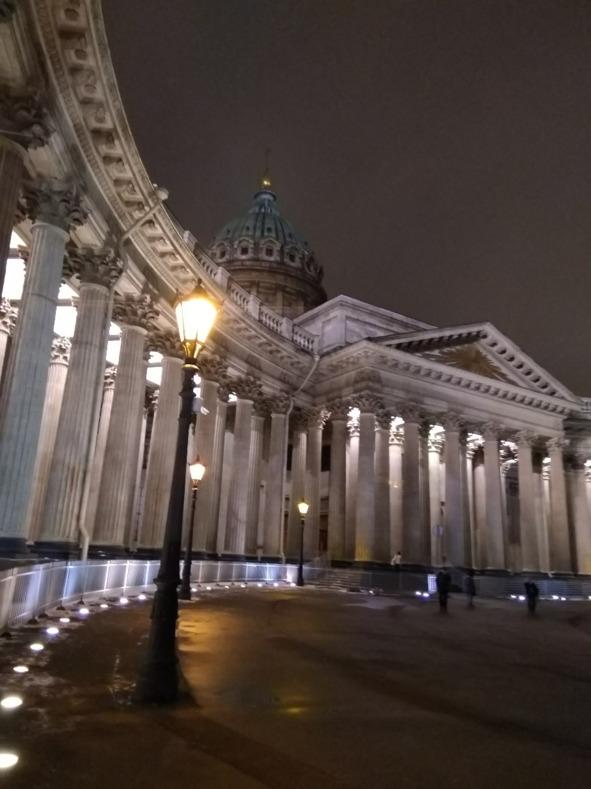
For example, in the photo of the Kazan Cathedral in St. Petersburg, the cross on the dome is located a few millimeters from the edge. It would be possible to raise the phone so that there is more sky in the frame. Only there would be another problem, the base of the lantern would have to be «cut off», and there would be less ground in the photo.

Nokia 6. 16 MP

Some mobile apps take square pictures with different effects. For example, «fish eye».

Sony Xperia L3. 15 MP

The most popular format is 4:3. Rectangular photos are taken by absolutely all smartphones. It is much easier to place an object in a rectangle than in a square.

Nokia 6. 16 MP. 4:3

The number of megapixels of smartphones with two or three cameras does not matter. In the 4:3 images, the smartphone «does not use» all its megapixels. For example, the Huawei U8 smartphone is equipped with three rear-view cameras with different resolutions: 48 MP/8 MP/2 MP. The resolution of a normal 4:3 photo with Huawei Y8P is 4000x3000 pixels (12 MP).

To increase the number of pixels in the image, select the high-resolution mode in the camera menu. Let’s compare photos from four smartphones with different numbers of cameras and their resolution.

Nokia 6, 4608x3456 pixels. Suzdal


BQ 6040 L Magic, 4160x3120 pixels. Suzdal
Lenovo K10, 4160x3120 pixels. Suzdal
Huawei Y8P, 4000x3000 pixels. Suzdal

All the photos were taken from the same point with a difference of a few seconds. The angle of view of the camera is also important, the larger it is, the more it will fall into the frame. The clarity of a photo does not always depend on its resolution, it’s just that photos with a large number of pixels are easier to frame without losing quality.

For example, the resolution of this photo is 8000x6000 pixels.

You can zoom in on the photo to see the details. Let’s conduct an experiment and try to "cut" several elements of the top photo.

Let’s try to "cut" two separate objects to look at the quality of the resulting image. In the background, the first tent church of Russia in Kolomenskoye. Let’s crop the image so that we can see the features of the dome: Result:

The image is not clear, but you can see the details. Let’s try to «cut out» the images of St. George the Victorious. Result:

What happens if you don’t» stretch" the resulting image? Let’s take a look:

The image quality has improved. You should not use images cut from large photos as a full-fledged snapshot. There are four more types of rectangular photos. For example, phones with any number of lenses can take pictures called «panorama». The main thing is to hold the phone vertically while shooting and follow the prompts of the mobile device.

Nokia 6, one camera

Pay attention to the format of panoramic images. Both photos were taken from the same point, the phones were held vertically. In the upper «panorama», the tree on the left almost completely fits into the frame. The image is smaller in height than the second one, but at the same time wider. Also pay attention to the position of the gray column in the foreground. The first photo does not show its lower part. Now let’s look at the second» panorama», it is smaller in width than the first one. You can see the bottom of the gray pillar and the grass around it. The Kremlin in the second photo is slightly larger than in the upper one (as if it was slightly enlarged). In the first photo, more objects are placed in the frame by the width of the images, in the second-by the height. I will not even talk about the difference in color, because this issue is worth considering in a separate chapter.

Huawei Y8P, three cameras

During the panorama shooting, the phone must be held evenly and smoothly moved, otherwise a damaged photo may turn out. Error of the Nokia 6 smartphone, the reason is a sharp movement of the phone.

All smartphones can take panoramic pictures, it’s just that there is not always a corresponding function in the camera menu. For example, there is no «panorama» option in the camera menu of Lenovo K10 Plus smartphones, but there is an image of a «double mountain». In fact, the smartphone takes a panoramic picture. Unfortunately, such photos have a defect, the feeling that they were taken through a fish-eye lens. The image is distorted, when shooting buildings, the middle of the photo turns out to be convex. In this mode, it is better to shoot nature.

Lenovo K 10 Plus, three cameras

An example of an unsuccessful photo with a Lenovo K 10 Plus.

Lenovo K 10 Plus, three cameras


Lenovo K 10 Plus, three cameras


Lenovo K 10 Plus, tree cameras

Phones with two and three cameras take photos in the format 16:9 and 18:9, 19,4:9. These are non-standard pictures that look quite strange.

Sony Xperia L3, 15 MP, 18:9

In photos 16: 9 and 18:9, the object is slightly enlarged compared to photos 4:3.

Nokia 6, 16 MP, 16:9

In the 19.4:9 images, the object is not enlarged.

Huawei Y8P, 19,4:9

Color rendering and photo effects

In a smartphone, the main thing is not the number of megapixels of the camera, but its color reproduction. Modern smartphones have an HDR function, it does not affect the clarity of the photo (many people confuse it with HD), since it is responsible for the brightness of the colors in the picture. In a split second, the smartphone takes several pictures with different shutter speeds and exposures and combines them into one image. The difference between an HDR photo and a regular one is not always noticeable.

BQ 6040 L Magic, HDR

Ordinary photography is not HDR:

BQ 6040 L Magic, HDR

The color reproduction is affected by the quality of the phone’s lens, its size and the matrix of the smartphone. The higher the price of the smartphone, the better the color reproduction. Photos from cheap smartphones are dull with a yellowish or grayish tint.

BQ 6040 L Magic

Let’s compare the photos from the phone and the SLR camera.

Huawei Y8P


SLR camera Canon EOS 4000 Kit


Huawei Y8P

SLR camera Canon EOS 4000 Kit


Huawei Y8P


SLR camera Canon EOS 4000 Kit

Let’s compare photos with Huawei and smart cameras.


Huawei Y8P


Smart camera Samsung

Let’s compare photos from smartphones Huawei Y8P (2020) and Nokia 6 (2018):

Huawei Y8P


Nokia 6


Huawei Y8P


Nokia 6

Conclusions: photos from a Huawei smartphone are worse than from a SLR camera. Photos from a Huawei smartphone are better than from a smart camera and a Nokia 6 smartphone.

If you are not satisfied with the mobile photo, you can edit it. For example, in the mobile application Photoshop Express or Lightroom.

The photo was taken using a cheap Chinese smartphone BQ 6040 L Magic:

The photo was processed in the free mobile application Adobe Photoshop Express:


You can add various photo effects in the editor. Original photos can be taken without a photo editor. Some smartphone models have photo filters in their own camera app. For example, BQ 6040 L Magic:


Photo with a photo filter from a smartphone BQ 6040L Magic

There are many photo filters in the «camera» application of the Huawei smartphone:


If there are no filters for photos in the Native Camera app, you can download the mobile app. For example, Bacon Camera, MX Camera, ProCam X Lite, Look, Fisheye Pro. These programs allow you to take retro photos in the style of the 30s, 70s. Fisheye Pro is designed to create photos with the effect of a fish eye and a TV screen.


A good 8K HD Camera application, takes photos in retro style.

Mobile application 8K HD Camera

Do not take black-and-white photos late at night and in poor lighting, do not take photos of dark objects in the evening.


Example of a bad photo

Some mobile apps make colored pictures instead of traditional photos. They can be useful for creating postcards, labels and book covers.


One rose with a mirror effect

Phones with two or more cameras allow you to create photos with a 3D effect, just install a special application. The KulaScope.

The application takes several photos and combines them into one image. While shooting, you need to move the smartphone slightly to the side.

The resulting three-dimensional image can be viewed using virtual reality glasses. Without glasses, the image looks like a normal photo.

St. Petersburg

Photographing at night

Let’s compare photos from an old phone and four smartphones.

This photo was taken by an old Nokia 7230 (2011) push-button phone in automatic mode:

Four photos were taken by a Samsung Galaxy Grand (2015) smartphone. They can not be called good, the smartphone takes bad photos at night. He couldn’t concentrate properly because of the poor lighting.


Three photos were taken by a Nokia 6 (2018) smartphone:


Three photos were taken by the BQ 6040 L Magic (2019) smartphone:


Eight photos were taken from a Sony Xperia L3 smartphone. The last three photos were taken with a zoom:


ловраывапорыв

Simple rules of mobile photography

1) Wait until the smartphone recognizes all the objects and focuses on them.

When the smartphone focuses, the image on the screen will become clear. Click the «take a picture» button.

Haste is one of the reasons for poor-quality photos. Good photos are obtained when everything is done correctly:

The phone may make a mistake in the focus point:

Due to a phone error, fuzzy images are obtained:

Select the focus point and tap on the smartphone screen in this place to correct the error:

The quality of photos will improve:

It is difficult for a smartphone to take photos from a close distance, move it a little further away from the object:

Wait until the photo is completed. Otherwise, the photo will turn out bad:

Two smartphone errors due to its movement:


Smartphones focus and take photos at different speeds. Consider three photos taken from different smartphones: Samsung Galaxy Grand 2, BQ6040 L Magic, Sony Xperia L 3:

Samsung


BQ


Sony

An error may occur when saving a photo. Check the photo after saving it.

2) Use a grid (you can enable it in the camera settings) or a horizontal level so that there is no error in perspective.

Smartphones take photos of buildings with a slope, so it is important to use a horizontal level

3) Do not take photos against the sun, the result is unpredictable.

The sun’s rays fall into the frame, even despite the foliage of the trees:

The photo may be too dark:

4) Change the exposure depending on the shooting conditions. The «Exposure Settings» slider is located on the phone screen. If you tap on the screen and do not release your finger, the image on the screen will become lighter. Does not lighten the image too much:

Sometimes the phone is wrong, and the buildings are too bright:

Choose a different shooting angle or change the exposure.

Types and genres of mobile photography

Color and black-and — white are the two main types of mobile photography.


Photos can be ordinary, spontaneous and staged. The usual ones are photos of architecture, landscapes, etc.

Ordinary photos:

Spontaneous photos are obtained by chance:


Staged photos are a way of self-expression of the author, they make sense.

What is this picture about? One white pawn among the black pieces can cause different associations. It can symbolize a person who is objectionable to society, who is very different from others. It can symbolize a good person among the evil ones. There is no unambiguous interpretation of the photo, the viewer will choose the appropriate option for himself. The photo is mine, so I can explain the composition. I am an introvert, and my worldview is very different from the views of the people around me. They do not understand me and do not want to understand me, I do not impose my views on anyone. Moreover, I am called abnormal and devalued, often humiliated. I am a white pawn, because society does not accept me because of my worldview. Why not a black pawn and why not white pieces? It’s not about my attitude to the reaction of others, it’s just that a white pawn surrounded by black pieces looks brighter and more spectacular. The picture with a black pawn surrounded by white pieces is uninteresting and not expressive.


There are several popular genres of mobile photography. Urban landscape:

There are several types of urban landscape.

Types of photos of urban landscapes:


1) The city is an industrial place. This direction includes images of transport, factories, residential buildings, technical objects;


2) City view. The theme of the photos is the city and the person, they show the life of people in the city, what problems they face;

3) Historical and cultural. These are photos of architectural monuments, places related to the history of the city;

4) Photos of parks, bridges, lanterns, road interchanges, etc.


I like to photograph stairs.

Some landscapes can hardly be called urban due to the lack of paved roads and the bustle in the photos:


Urban landscapes are easily confused with photos of architecture.

Ordinary landscapes:

Portraits are another genre of mobile photography. Selfies are taken more often than portraits of other people. Photos of food are very popular, they are often posted on social networks:

The genre of mobile photography architecture-photos of various buildings, building element:


Subject photography is one of the rarest genres of mobile photography.

Photos of objects must be edited:

Not all smartphones can take photos of objects at close range. Subject shooting requires good lighting and a tripod.

Bad photo